20251012 - Perplexity AI的隐藏功能:提醒与任务设置指南
- 分类:
根目录笔记 - 创建:
2025-10-12 - 标签:
Perplexity AI, 提醒功能, 任务设置, AI工具, 新闻更新, 天气预报, 股票提醒, ChatGPT, 自动化任务, 科技教程
20251012 - Perplexity AI的隐藏功能:提醒与任务设置指南 - This one Perplexity feature is a lifesaver for productivity — here’s how to use it
摘要
本文介绍了Perplexity AI的一项隐藏功能——提醒与任务设置。用户可以通过该功能获取每日新闻摘要、股票洞察、天气预报等信息,并可自定义任务和提醒频率。文章详细说明了设置步骤,包括登录账户、选择任务工具、创建任务、调整设置及选择通知方式。此外,还提到ChatGPT也提供类似功能,但两者的任务重点有所不同,Perplexity更适合新闻更新和深入研究,而ChatGPT更适合文档创建等深度任务。
要点
- Perplexity AI推出了一项隐藏的提醒与任务功能,可用于每日新闻、股票提醒、天气预报等。
- 用户可自定义任务,设置运行频率(一次性、每日、每周、每月或每年)。
- 设置步骤包括登录账户、访问任务工具、描述任务、调整频率和通知方式。
- 高级设置允许用户选择信息来源和AI模型。
- ChatGPT也提供类似功能,但Perplexity更专注新闻和研究,ChatGPT更适合深度任务如文档撰写。
正文
(Image credit: Shutterstock)
When it comes to AI tools, it's not all ChatGPT, Claude or Gemini. There are plenty of other tools out there with lots to offer. One that I’ve got a lot of use out of is Perplexity, and there is one hidden feature that has become a daily tool for me.
Perplexity has, over the past couple of months, silently launched an alerts and tasks function. It has been hidden away in the settings, but it can be a really useful tool for a variety of needs.
Via this tool, you can get a daily digest of the morning news, a weekly portfolio of stock insights, or timely reminders if a certain stock falls in price, and even a monthly digest of the biggest breakthroughs in science.
While there is a set of pre-made options that you can use, it is also just as easy to set up your own reminders. Simply describe what you want to automate and then choose a frequency. The reminder or task can be run once, daily, weekly, monthly or yearly at a certain time.
I asked Perplexity to give me a daily reminder of the weather and news in Bristol, UK. It came back with its instructions, stating that each morning it would run the “Latest news headlines and weather forecast for Bristol, UK, including local events, public services updates, and daily weather conditions.”
You can get pretty creative with this, setting up reminders to buy Christmas presents and have Perplexity search the web for good present ideas for certain people, or have it provide you with a new topic to learn about each morning with a detailed explanation.
How to set up alerts and tasks
1. Open Perplexity

(Image: © Future)
Open up your Perplexity account. You can do this either on a desktop or via the app. To use this feature, you need to sign in to a Perplexity account.
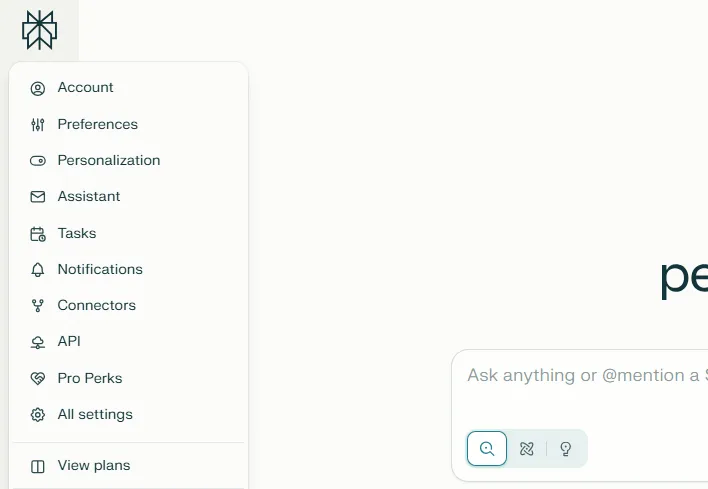
From here, click the account settings. This is clearly identifiable by the silhouette, which says account underneath.
2. Select the tasks tool
(Image: © Future)
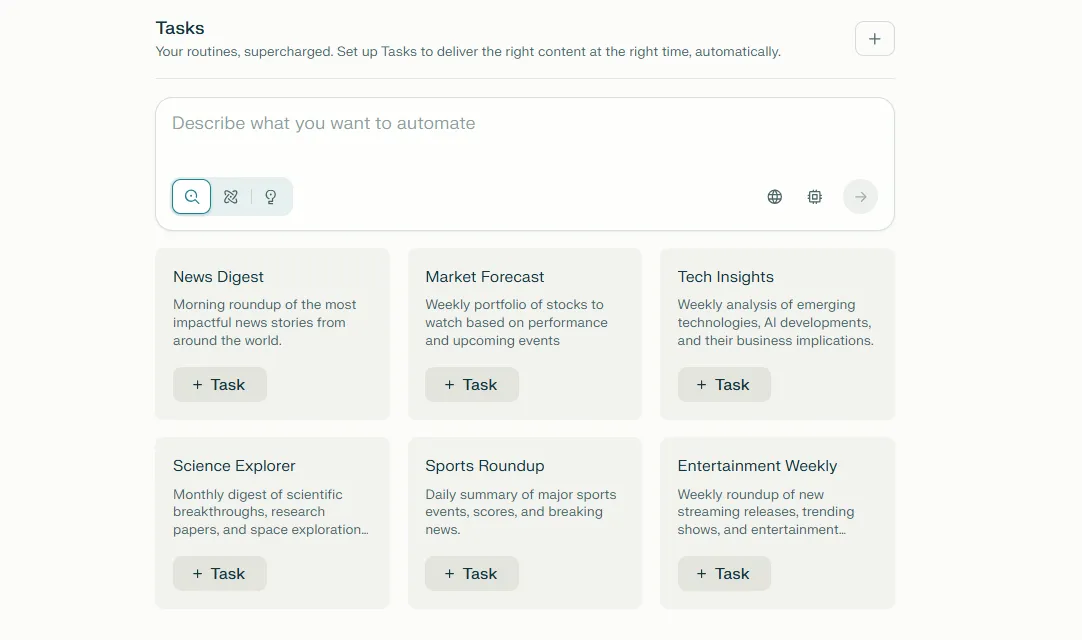
When you open up the settings, there will be a Task section. Open up this setting, and you'll see two options, to describe what you want to automate or to use one of the pre-selected options. These range from daily news updates to sport roundups.
3. Create your task
(Image: © Future)
If you choose to write your own task, you just need to give it a simple explanation of what you are after. For example “daily weather updates in [your local area]. Perplexity will then re-write this into a clear set of instructions to run.
4. Alter your settings
(Image: © Future)
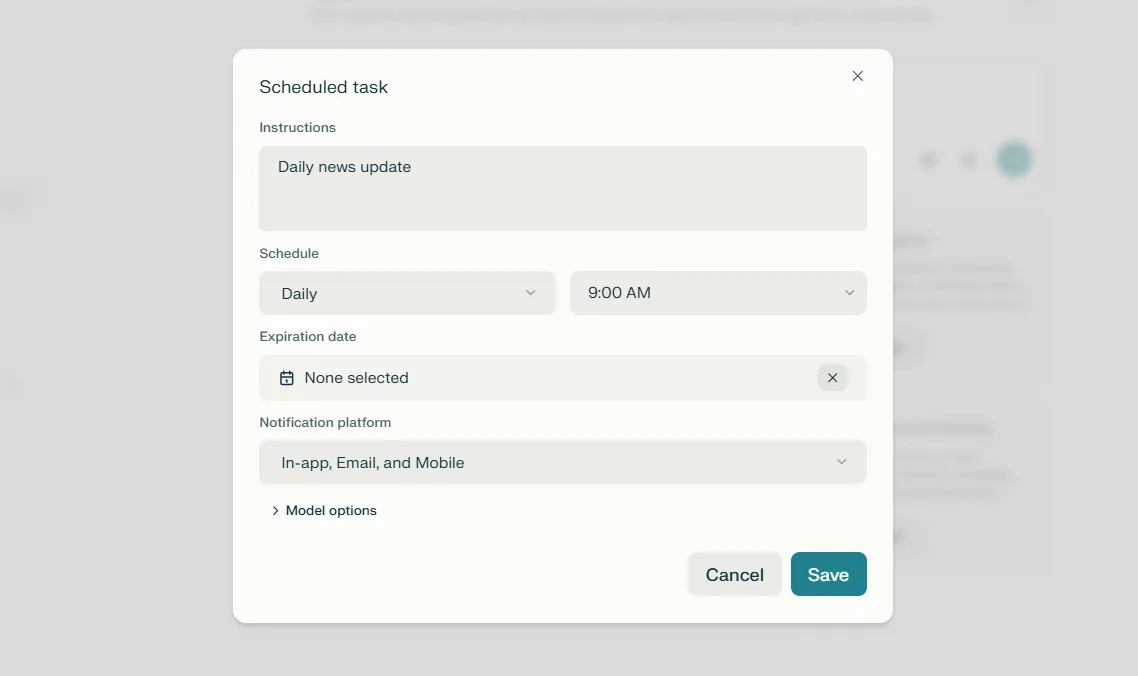
Once you’ve picked your task, set the schedule and expiration date if needed. Finally, you can choose how you want the notification to be sent. This can be in the app, via email or by text.
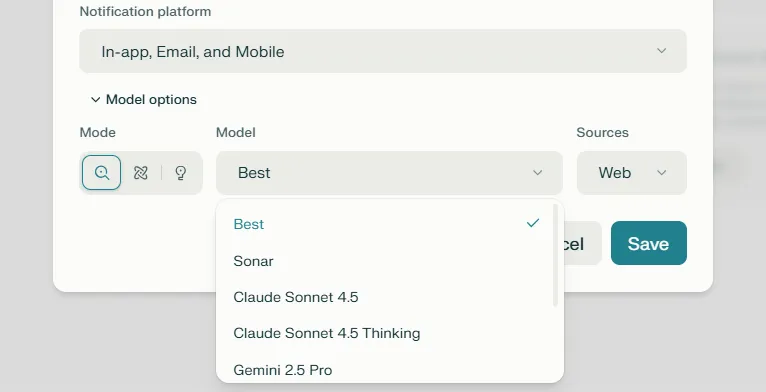
5. Choose advanced settings
(Image: © Future)
If you want to really dig into the details, you can even select how the information is sourced and which AI model you want to run the task each day.
Can any other AI tools run these tasks?
It’s not just Perplexity that can do this. ChatGPT has a Scheduled Tasks feature, letting users put in a query to complete later.
This works in a very similar way to the version that Perplexity offers. You can set these tasks to operate daily, weekly, or monthly, and they can operate based on whatever prompt you require.
Perplexity is a bit more focused on tasks like repeated news updates or deep dives on complicated topics. ChatGPT, on the other hand, is more focused on tasks with more depth, like creating documents or writing morning emails to be sent out.
Both work great, but are focused on different types of tasks.
Follow Tom's Guide on Google News and add us as a preferred source to get our up-to-date news, analysis, and reviews in your feeds. Make sure to click the Follow button!
- Alexa+ — here's everything you need to know
- You can now make Spotify playlists using ChatGPT — here’s how to do it
- 7 prompts for Sora 2, Meta Vibes and Veo to get Hollywood-level results
Category
Back to Laptops
Brand
Processor
RAM
Storage Size
Screen Size
Colour
Condition
Storage Type
Price
Any Price
Showing 10 of 225 deals
Filters ☰