20260215 - Claude.md 文件如何自动为 Claude 提供每次会话所需的上下文 - Claude Code for Everything The Best Personal Assistant Remembers Things About You (A CLAUDE.md Deep Dive)
- 分类:
Clippings - 创建:
2026-02-15 - 标签:
Claude.md, AI上下文管理, 知识管理, AI工作流程, 自动化, Markdown文件, 生产力工具, 团队协作, 组织结构, AI助手
20260215 - Claude.md 文件如何自动为 Claude 提供每次会话所需的上下文 - Claude Code for Everything: The Best Personal Assistant Remembers Things About You (A CLAUDE.md Deep Dive)
摘要
本文介绍了 CLAUDE.md 文件,这是一种允许 AI 在每次会话中自动加载上下文的 Markdown 文件。通过组织文件夹结构和创建 CLAUDE.md 文件,可以为 Claude 提供针对特定任务的精确信息,而不是不必要的全部信息。文章提供了三种编写 CLAUDE.md 文件的方法(规划模式访谈、加载现有文档、从会话生成),并强调了保持文件精简和迭代的重要性。最终目标是让 Claude 像一位有经验的助手一样,每次都能带着必要的背景知识开始工作,从而提高效率和输出质量。
要点
- CLAUDE.md 文件是 Markdown 文件,可为 Claude 提供持久的内存,在每次会话开始时自动加载。
- 文件夹结构决定了 Claude 可以访问的上下文,应反映用户的思维方式。
- 每个 CLAUDE.md 文件应包含:文档索引、相关人员、项目背景和工作流程。
- CLAUDE.md 文件应遵循“层级越高,内容越精简”的原则。
- 编写 CLAUDE.md 文件的方法:规划模式访谈、加载现有文档、从会话生成。
- Claude 可协助生成 CLAUDE.md 文件,用户进行编辑。
- 保持 CLAUDE.md 文件精简的重要性,以避免消耗过多上下文空间和降低输出质量。
- CLAUDE.md 文件维护:在工作会话后更新,以及在不断重复解释相同信息时添加。
- CLAUDE.md 文件不应包含敏感信息、过时信息或不属于该层级的信息。
- CLAUDE.md 文件与会话内上下文管理(例如
/clear命令)协同工作,以优化 AI 助手体验。
正文
How CLAUDE.md files give Claude the context it needs to be effective, automatically, every session
This is the third article in my series on Claude Code for Everything - work and life.
- First article covers setup and installation.
- Second article (this article) covers the core workflow: plan mode, parallel sessions, and session management.
- Third article covers context management - the key to maintaining great output quality over long conversations with Claude.
- Fourth article covers drafting in Claude Code and collaborating in Notion.
- Fifth article* (this article)* covers CLAUDE.md files - so Claude already knows how you work before you say a word.
“Hi! Nice to meet you. What’s your name? What do we do here?”
It’s 9am. You spent all of yesterday onboarding this person. Building the context they need to actually be effective in their role - not just what the project is, but how your organization works. Which stakeholders matter. The unwritten rules. Your preferences, your constraints, and the decisions you’ve already made. This is the expensive part of having an employee: the hours you invest building the context that turns them from “new hire who needs hand-holding” into “teammate who can actually help.”
By end of day yesterday, that investment paid off. They finally had enough context to be useful. And now they’re back at your desk asking who you are. This isn’t new. This is your morning routine now - and has been for three months.
Every single day, you rebuild from scratch. Your role, the project, the constraints. Your VP hates bullet points. Legal needs two weeks for any contract review. The NYC office runs on a different fiscal calendar. All the context that took you months to accumulate - you re-transfer it in an hour every morning. And every night, it disappears.
By 10am, they’re up to speed. And here’s the thing - once they have context, they’re good. Really good. They draft proposals that actually sound like you. They organize research the way you’d organize it. They make decisions you agree with. Sharp, capable, the kind of help you’ve always wanted.
That’s why you keep doing it. The hour of rebuilding is worth it for a full day of actually useful work.
Then they go home. And the next morning: “Hi! Nice to meet you.”
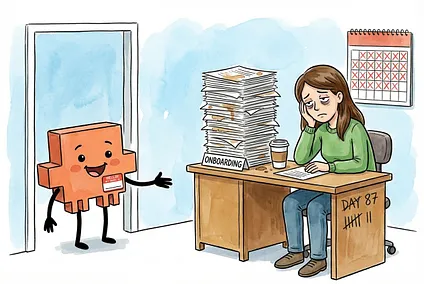
You’d never keep an employee like this - except they’re so valuable once they’re up to speed that you tolerate the daily reset.
This is exactly what using most AI tools feels like - ChatGPT, Claude on the web, you name it. Every session, a blank slate. Every conversation, starting from zero. And just like with that employee, you tolerate it - because once you’ve rebuilt the context, the output is worth it.
But what if you didn’t have to start from scratch?
Claude Code has a feature that changes this: CLAUDE.md files. They’re onboarding documents that load automatically before you type a single word. Your AI agent shows up already knowing who you are, what you’re working on, and how you like things done. No re-explaining. No starting from zero.
That’s the employee you actually wanted and that’s what this article is about.

A quick note: This article focuses on CLAUDE.md files in Claude Code, but everything covered here applies to Claude Cowork (which loads CLAUDE.md files the same way when you open a folder) and AGENTS.md in Cursor, Antigravity, or any other AI tool that auto-loads instruction files. If you want to learn how to give your AI agent persistent memory across sessions - regardless of which tool you use - this article is for you. Everything covered in this guide, from hierarchical loading to structuring context by project, works the same way regardless of which tool you use. The time invested in learning how to organize and auto-load context through your folder structure pays off everywhere. As you read, just replace “CLAUDE.md” with “AGENTS.md” — or whatever your favorite tool calls it. (For the official guide on CLAUDE.md files, see Anthropic’s documentation.)
By the end of this article, you’ll have:
- An understanding of what CLAUDE.md files are: Simple markdown files that give Claude persistent memory.
- A folder structure that matches how you work: Organized so the right context loads automatically for each area and project without cluttering your sessions with context you don’t need.
- A framework for what goes in each CLAUDE.md file: What to include at each level of your work, from broad preferences down to specific project details, with concrete examples you can adapt.
- Three methods for writing CLAUDE.md files: Load existing docs, generate at the end of a session, or have Claude interview you. Claude does the writing, and you edit.
- The full picture: How intra-session context management (the previous article) and inter-session context (this article) work together.
- Your first CLAUDE.md file: By the end, you’ll create a CLAUDE.md file for one of your own projects. You won’t just learn the system - you’ll actually start using it.
One thing before we dive in: this is a long guide, and you’re not going to walk away with the perfect folder structure and perfectly tuned CLAUDE.md files in one sitting. That’s not the goal. The goal is to understand the system - how CLAUDE.md files load, what goes in each one, and why folder structure matters - so that when something isn’t working, you know what to change and where.
Start by building out the folder structure and CLAUDE.md files for the area where you work most and expand from there. You’ll figure out what works by using them - noticing what context you keep re-explaining, what instructions Claude isn’t following, and what’s loading that you don’t need. That’s not a sign you’re doing something wrong. That’s the process. What matters is starting - documenting the context Claude needs to show up as an effective junior employee every session, and iterating from there.
Quick Refresher: Context 101
CLAUDE.md files give your employee memory. But there’s a catch you need to understand first.
Claude can only hold so much information at once. Every AI model has a limit on how much text it can see and work with in a single conversation - this is called the context window. Think of it like a filing cabinet. Each conversation you start is one drawer, and that drawer has a fixed amount of space.
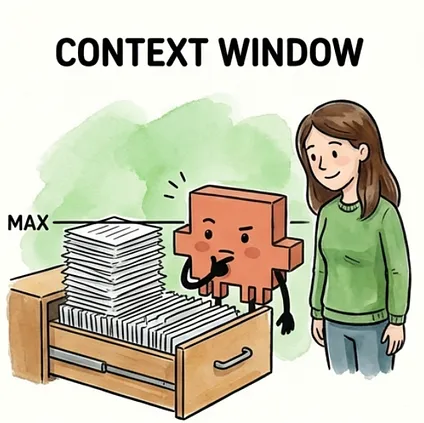
As you work together, the drawer fills up. Everything you say to Claude, every file you share, every response Claude writes back - it all goes into that drawer. And it fills up faster than you’d expect. A few long files, a detailed back-and-forth, some research - suddenly the drawer is getting crowded.
Here’s what most people miss: the space in that drawer isn’t just for storage. It’s also where Claude thinks. The room left over after all your messages and files is where Claude reasons through problems, considers options, and drafts responses. This is thinking room.
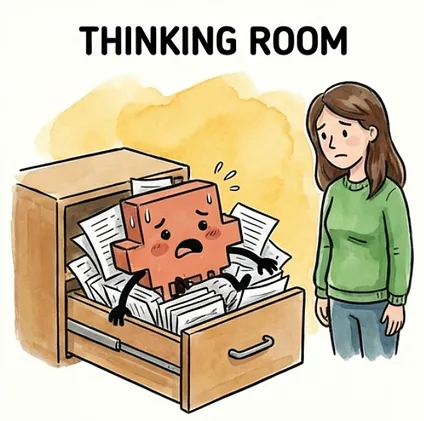
A stuffed drawer doesn’t just mean less storage - it makes Claude worse at its job. Less room to think means lower quality output, more shortcuts, and more missed details. (For the full deep dive on context and how it impacts output quality, see the first article on context management.)
一个塞满的抽屉不仅仅意味着存储空间变小——它还会让 Claude 在工作中表现更差。思考空间越小,输出质量就越低,它会采取更多的捷径,遗漏更多的细节。(关于上下文及其对输出质量影响的深度解析,请参阅关于上下文管理的**第一篇文章**。)
More context loaded = less room to think = lower quality output.
加载的上下文越多 = 思考空间越小 = 输出质量越低。
That’s counterintuitive. You’d think giving Claude more information would make it smarter. But there’s a trade-off: every piece of context you load takes up space that Claude could be using to think. It’s like giving your employee a 500-page briefing document before a 30-minute task. Sure, somewhere in those 500 pages is the info they need. But now they’re drowning in paper instead of doing the work.
这似乎有些违反直觉。你可能会认为,提供更多信息会让 Claude 变得更聪明。但这里存在一个权衡:你加载的每一个上下文都会占用 Claude 可以用来思考的空间。这就好比在给你的员工一项 30 分钟的任务之前,给他们一份 500 页的简报。当然,那 500 页中包含了他们需要的信息。但现在,他们淹没在纸张中,而不是在工作。
Remember: CLAUDE.md files load automatically when you start a session. That’s the whole point - your employee shows up already briefed, no re-explaining required. But that same power makes it easy to shoot yourself in the foot. That auto-loaded context goes into the drawer before you even type anything. Every line in your CLAUDE.md file takes up space. Load a 500-line file full of project history, meeting notes, and every decision you’ve ever made? You’ve already eaten into your thinking room before the conversation begins.
请记住:CLAUDE.md 文件会在您开始会话时自动加载。这就是它的意义所在——您的员工一登场就已了如指掌,无需再次解释。但同样的强大功能也可能让您“搬起石头砸自己的脚”。在您开始输入任何内容之前,该自动加载的上下文就已经被放入了“抽屉”。您的 CLAUDE.md 文件中的每一行都会占用空间。加载一个包含 500 行项目历史、会议记录以及您曾经做出的每一个决定的文件?在对话开始之前,您就已经挤占了您的思考空间。
This is why we need to get CLAUDE.md files right. The goal isn’t to stuff Claude full of information. The goal is to give Claude exactly what it needs for the specific task you’re working on - and nothing more. That’s what this article teaches: how to use CLAUDE.md files to load the right context at the right time - not all the context, all the time.
这就是为什么我们需要正确使用 CLAUDE.md 文件。目标不是往 Claude 里塞满信息。目标是为 Claude 提供它在特定任务所需的精确内容——不多不少。本文将教您:如何使用 CLAUDE.md 文件在正确的时间加载正确的上下文——而不是在所有时间加载所有上下文。
What CLAUDE.md Files Are (and How They Work)CLAUDE.md 文件是什么(以及它们如何运作)
CLAUDE.md files are plain text files written in markdown. The name tells you what they are: files written for Claude, in markdown format.
CLAUDE.md 文件是使用 markdown 编写的纯文本文件。文件名就说明了它们的用途:为 Claude 编写的、使用 markdown 格式的文件。
Think of them as onboarding guides for your employee. Not the kind they read once and forget - the kind they read every single morning before starting work. Who you are and how you work. What this project is about. Key decisions that have already been made. Where to find things. Your employee shows up already knowing all of it, every session, without being told.
将它们想象成员工的入职指南。不是那种只看一遍就忘的指南,而是他们每天早上开始工作前都会阅读的指南。你是谁,你是如何工作的。这个项目是关于什么的。已经做出的关键决定。在哪里可以找到东西。你的员工一出现就知道所有这些,每一场会议,无需告知。
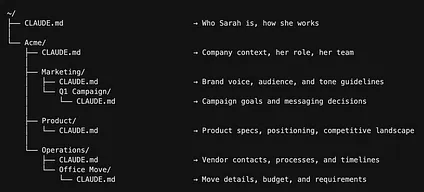
To see how this works in practice, meet Sarah. She’s Head of Ops at Acme, a 20-person startup, and she works across Marketing, Finance, and Operations. That means she needs Claude to understand completely different contexts depending on what she’s working on.
为了看到这是如何实际运作的,我们来认识一下 Sarah。她是 Acme(一家 20 人的初创公司)的运营主管,她负责市场营销、财务和运营。这意味着她需要 Claude 完全理解不同的上下文,具体取决于她正在处理什么。
Remember, Claude Code works with files and folders on your computer. (If you followed my installation guide, your working folder is backed up to cloud storage so you’re not at risk of losing anything locally.) Sarah has actual folders on her computer (created within the Google Drive desktop app), and each one has its own CLAUDE.md file:
请注意,Claude Code 可以处理您计算机上的文件和文件夹。(如果您遵循了我的安装指南,您的工作文件夹已备份到云存储,因此您不会面临本地丢失任何内容的风险。)Sarah 在她的电脑上拥有实际的文件夹(在 Google Drive 桌面应用内创建),每个文件夹都有自己的 CLAUDE.md 文件:
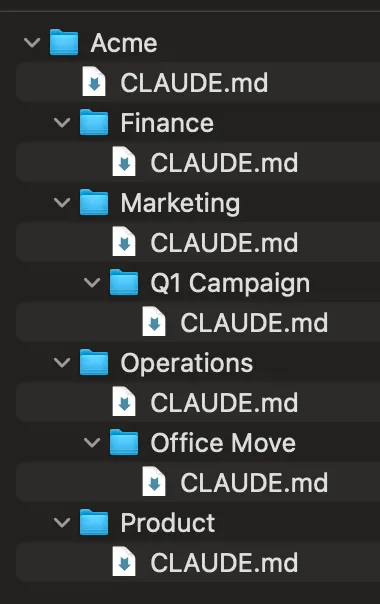
File system view 文件系统视图
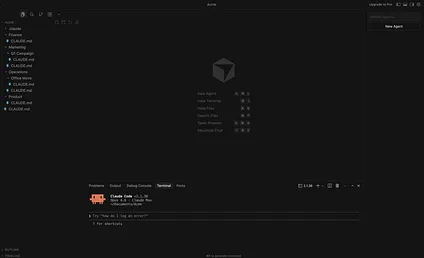
Cursor view 光标视图
Each file contains context specific to that level. The deeper the folder, the more specific the context. Sarah will be our running example for the rest of this article.
每个文件都包含特定于该级别的上下文。文件夹越深,上下文就越具体。在本文的其余部分,我们将以 Sarah 作为贯穿始终的示例。
Here’s where it gets powerful. Claude doesn’t just load one CLAUDE.md file - it loads every CLAUDE.md file from the folder you’re working in all the way up to the top. These onboarding guides stack. More specific folder means more specific context layered on top of the general stuff.
这就是它变得强大的地方。Claude 不仅加载一个 CLAUDE.md 文件——它会加载你正在工作的文件夹中所有 CLAUDE.md 文件,一直到顶层。这些入职指南是叠加的。更具体的文件夹意味着更具体的上下文叠加在通用内容之上。
What happens when two files disagree? Say Sarah’s top-level ~/CLAUDE.md says “Use bullet points over long paragraphs.” But her Marketing CLAUDE.md says “Use flowing paragraphs for brand storytelling.” When she’s working in Marketing, the Marketing instruction wins — the more specific file takes priority. When she’s in Finance, the top-level rule still applies because nothing more specific in the Finance CLAUDE.md has replaced it. Think of it like a department manager’s instructions overriding the company handbook.
当两个文件意见不合时会发生什么?假设 Sarah 的顶层 ~/CLAUDE.md 说“使用项目符号而不是长段落”。但她的 Marketing CLAUDE.md 说“使用流畅的段落进行品牌故事叙述”。当她在 Marketing 部门工作时,Marketing 的指令胜出——更具体的文件优先。当她在 Finance 部门工作时,顶层规则仍然适用,因为 Finance CLAUDE.md 中没有任何更具体的内容取代它。可以将其视为部门经理的指示覆盖了公司手册。
Sarah opens her IDE in her Acme folder and tells Claude:
Sarah 在她 ACME 文件夹中打开了她的 IDE,然后对 Claude 说:
Draft the launch email for our Q1 campaign.
为我们的 Q1 活动起草启动邮件。
Claude navigates to the Q1 Campaign folder and four CLAUDE.md files load automatically:
Claude 导航至 Q1 Campaign 文件夹,四个 CLAUDE.md 文件自动加载:
- Personal preferences (
~/CLAUDE.md): How Sarah communicates, her working style
个人偏好(~/CLAUDE.md):Sarah 的沟通方式、她的工作风格 - Company context (
~/Acme/CLAUDE.md): What Acme does, Sarah’s role, and her team
公司背景(~/Acme/CLAUDE.md):Acme 的业务、Sarah 的角色及其团队 - Marketing context (
~/Acme/Marketing/CLAUDE.md): Brand voice, target audience, and tone
营销背景(~/Acme/Marketing/CLAUDE.md):品牌声音、目标受众和语气 - Campaign context (
~/Acme/Marketing/Q1 Campaign/CLAUDE.md): Campaign goals, key messaging, and target segments
活动背景(~/Acme/Marketing/Q1 Campaign/CLAUDE.md):活动目标、核心信息和目标细分
Claude already knows who Sarah is, what Acme does, the brand voice, and the campaign goals. She doesn’t re-explain any of it. She just asks for the email.
Claude 已经知道 Sarah 是谁,Acme 的业务是什么,品牌声音是什么,活动目标是什么。她不会重新解释任何内容。她只需要发送邮件。
Later that day, Sarah switches gears:
当天晚些时候,Sarah 转变了话题:
Finalize the office move timeline.
确定办公室搬迁时间表。
Claude navigates to the Office Move folder and a different set of CLAUDE.md files loads.
Claude 导航到“Office Move”文件夹,加载了一组不同的 CLAUDE.md 文件。
How does Claude know where to go? Remember, Sarah opens Claude Code in her Acme folder.
Claude 怎么知道去哪里?请记住,Sarah 在她的 Acme 文件夹中打开了 Claude Code。
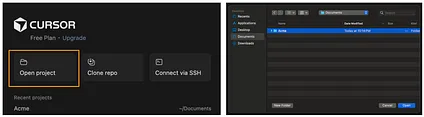
Opening the Acme folder in Cursor 在 Cursor 中打开 Acme 文件夹
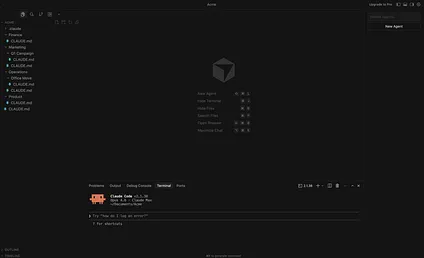
Acme folder opened in Cursor Acme 文件夹已在 Cursor 中打开
The Acme CLAUDE.md loads immediately - and it includes a project structure that maps out all her folders (we’ll cover how to set this up later in the article). When she mentions the office move, Claude sees Operations/Office Move/ in that map and navigates there. As it does, the Operations and Office Move CLAUDE.md files load along the way.
Acme CLAUDE.md 会立即加载——它包含一个项目结构,概述了她所有的文件夹(我们将在文章后面介绍如何设置)。当她提到搬办公室时,Claude 会在那个地图中看到 Operations/Office Move/ 并导航到那里。在此过程中,Operations 和 Office Move CLAUDE.md 文件也会随之加载。
- Same personal preferences (
~/CLAUDE.md)
相同的个人偏好(~/CLAUDE.md) - Same company context (
~/Acme/CLAUDE.md)
同一公司背景(~/Acme/CLAUDE.md) - Operations context (
~/Acme/Operations/CLAUDE.md): vendor contacts and processes
运营背景(~/Acme/Operations/CLAUDE.md):供应商联系方式和流程 - Office move context (
~/Acme/Operations/Office Move/CLAUDE.md): timeline, budget, and lease details
办公室搬迁背景(~/Acme/Operations/Office Move/CLAUDE.md):时间表、预算和租赁细节
No marketing context loading when she’s doing operations work. No operations context when she’s doing marketing.
她在进行运营工作时,不会加载营销相关的上下文。她在进行营销工作时,不会加载运营相关的上下文。
This is how you load the right context, not all the context.
这就是加载正确上下文的方法,而不是加载所有上下文。
To check what Claude has loaded at any point, just ask:
要随时查看 Claude 加载了哪些内容,只需提问:
Which CLAUDE.md files are in your context?
你的上下文中包含哪些 CLAUDE.md 文件?
Claude will tell you exactly which files it’s working with. You can also watch it happen in real time: when Claude navigates to a folder, the terminal shows each CLAUDE.md file loading in, one by one. This is another reason to use the Claude Code CLI in your terminal rather than the Claude Code IDE extension: you can see exactly what Claude is doing at every step.
Claude 会准确告知它正在处理哪些文件。您还可以实时观看此过程:当 Claude 导航到某个文件夹时,终端会逐一显示每个 CLAUDE.md 文件加载。这也是在终端中使用 Claude Code CLI 而不是 Claude Code IDE 扩展的另一个原因:您可以确切地了解 Claude 在每一步的操作。
The CLAUDE.md How-To CLAUDE.md 使用指南
You now understand what CLAUDE.md files are and how they load. Now let’s learn how to set yours up. This section covers four things:
您现在已经了解了 CLAUDE.md 文件是什么以及它们是如何加载的。现在让我们学习如何设置您自己的文件。本节将涵盖四点:
- How to organize your folders so the right context loads automatically
如何组织文件夹以便自动加载正确的上下文 - What to include in each CLAUDE.md file (and what to leave out)
每个 CLAUDE.md 文件应包含什么(以及不应包含什么) - How to write them (Claude does most of the work - you edit)
如何编写它们(Claude 会完成大部分工作——你来编辑) - How to keep them lean over time as your work evolves
随着工作的演变,如何随着时间的推移保持它们的精简
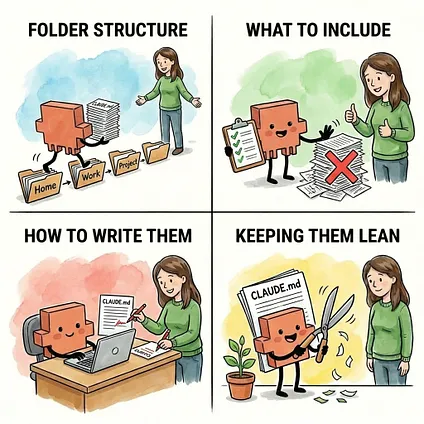
We’ll cover each one twice - first the short version, enough to start building right now, then the deep dive for when you want the full picture. The short version tells you what to do. The deep dive tells you why it works - so when your setup isn’t working the way you’d expect, or you’re trying to optimize what you’ve built, you’ll know exactly where to look.
我们将分别对每一项进行两次讲解——首先是简短版本,足以让你立即开始构建,然后是深入讲解,适用于你想要了解全貌的时候。简短版本会告诉你该做什么。深入讲解会告诉你它为什么有效——这样,当你的设置不如预期时,或者你想优化你构建的东西时,你就确切地知道该从哪里入手。
The short version 简短版
Here’s how to set up your CLAUDE.md files in four steps:
以下是设置 CLAUDE.md 文件的四个步骤:
- Organize your folders to mirror how you think about your work. Your folder structure is the foundation - it directly controls what context Claude loads and when. Most people’s work naturally falls into a few levels: the project itself, the areas within it (marketing, finance, operations), and the specific things you’re working on (Q1 campaign, 2026 budget). Each level maps to a folder, and each folder can hold a CLAUDE.md file. The structure should mirror how you already think about your work - not some arbitrary system you’re forcing yourself into.
整理你的文件夹,以反映你对工作的思考方式。你的文件夹结构是基础——它直接控制 Claude 加载什么上下文以及何时加载。大多数人的工作自然会分为几个层次:项目本身、项目中的领域(营销、财务、运营)以及你正在处理的具体事项(第一季度活动、2026 年预算)。每个层次都映射到一个文件夹,每个文件夹都可以包含一个 CLAUDE.md 文件。结构应该反映你对工作的思考方式——而不是某种你强迫自己去适应的任意系统。 - Create a CLAUDE.md file in each active folder. Not every folder needs one - just the ones where you’re actively working across multiple sessions. Each CLAUDE.md file covers four types of context: a document index (where things are), the people involved (so Claude knows who “Lisa” is without you re-introducing her), what this is about (goals, decisions, key facts), and how you want things done (workflows, guardrails, preferences). Higher-level files should be shorter. Your top-level preferences file should fit on one screen. Your project-level files can be longer.
在每个活动文件夹中创建一个 CLAUDE.md 文件。并非每个文件夹都需要一个——只需在你跨多个会话积极工作的文件夹中创建。每个 CLAUDE.md 文件涵盖四种类型的上下文:文档索引(事物所在的位置)、相关人员(以便 Claude 知道“Lisa”是谁,而无需你重新介绍)、本次相关事项(目标、决策、关键事实)以及你希望事情如何完成(工作流程、安全措施、偏好)。更高级别的文件应该更短。你的顶层偏好设置文件应该能显示在一屏内。你的项目级别文件可以更长。 - Let Claude write them. You don’t write CLAUDE.md files from scratch - Claude does most of the work, and you edit. There are three methods depending on what you’re starting with: 1) go into plan mode and have Claude interview you about your work (great when the context lives in your head), 2) point Claude to existing docs and have it generate the file (great when you already have briefs or wikis), or 3) ask Claude to capture context at the end of a working session. Whichever method you use, review every line. Claude produces a starting point, not a finished product.
让 Claude 来写。你不是从头开始编写 CLAUDE.md 文件——Claude 会做大部分工作,而你进行编辑。根据你的起始点,有三种方法:1) 进入计划模式,让 Claude 采访你关于你的工作(当上下文存在于你的脑海中时非常有用);2) 指导 Claude 查看现有文档,让它生成文件(当你已经有简报或维基时非常有用);或 3) 要求 Claude 在工作会议结束后捕获上下文。无论使用哪种方法,都要审查每一行。Claude 生成的是一个起点,而不是最终产品。 - Keep them lean. CLAUDE.md files tend to grow as you add context after sessions - that’s fine, as long as you periodically trim. Two habits help: after big sessions, ask Claude if the CLAUDE.md needs updating, and when a file has gotten noticeably longer than when you created it, check if everything still earns its place. Cut anything about finished projects, outdated decisions, or context that’s only relevant sometimes.
保持精简。CLAUDE.md 文件会随着你在会话后添加上下文而增长,这没关系,只要你定期修剪即可。有两个习惯很有帮助:大型会话结束后,询问 Claude CLAUDE.md 是否需要更新;当文件比你创建时明显变长时,检查所有内容是否仍然有其价值。删除关于已完成项目、过时决定或仅有时相关的内容。
One thing to keep in front of you through all four steps: remember the trade-off from earlier - every line in a CLAUDE.md file costs thinking room. The goal isn’t to document everything. It’s to give Claude exactly what it needs, and nothing more.
在所有四个步骤中,请始终牢记这一点:记住前面提到的权衡——CLAUDE.md 文件中的每一行都会消耗思考空间。目标不是记录一切,而是为 Claude 提供它所需的一切,不多也不少。
And don’t worry about getting it perfect on the first try. Your CLAUDE.md files will evolve as you use them - you’ll notice what’s missing, what’s cluttering things up, and what needs to move. That’s the whole point of step 4. Start lean, iterate as you go.
而且,不必担心第一次就能做到完美。你的 CLAUDE.md 文件会在你使用过程中不断完善——你会注意到哪些东西缺失了,哪些东西让内容变得混乱,以及哪些东西需要调整。这正是第四步的意义所在。开始时保持精简,然后逐步迭代。
If you want to start building now, skip to Your First Hour. Otherwise, keep reading - the rest of this section goes deep on each of the four steps.
如果你想立即开始构建,请跳到“你的第一个小时”。否则,请继续阅读——本节的其余部分将深入探讨这四个步骤。
The deep dive 深入解析
1. Your folders control what Claude knows1. 您的文件夹决定了 Claude 了解什么
How your folder structure determines which context loads automatically - and how to organize yours so the right information shows up without the wrong information coming along for the ride.
您的文件夹结构如何决定自动加载哪些上下文——以及如何组织您的文件夹,以便正确的信息出现,而错误的信息不会被带入。
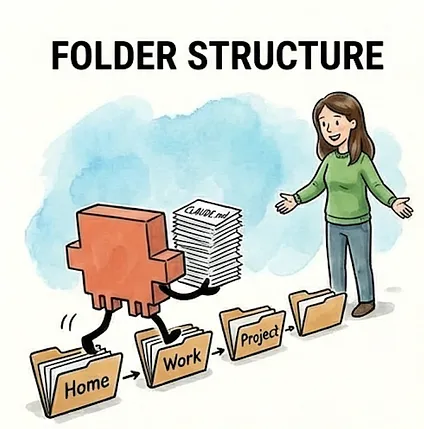
We just saw how Sarah’s CLAUDE.md files stack automatically based on where she’s working. Marketing context loads for marketing work, operations context for operations work. The right context, not all the context.
我们刚才看到了 Sarah 的 CLAUDE.md 文件如何根据她正在工作的地点自动堆叠。营销工作加载营销上下文,运营工作加载运营上下文。是正确的上下文,而不是全部上下文。
But here’s what makes that possible: her folder structure.
但正是她的文件夹结构让这一切成为可能。
Your folders aren’t just a way to keep files organized. They directly control what context Claude has access to. The folder structure is the foundation of the whole system.
文件夹不仅仅是整理文件的方式。它们直接控制着 Claude 可以访问的上下文。文件夹结构是整个系统的基础。
Most people’s work naturally falls into a few big buckets - a work project, a personal project, maybe a side project. Each of those becomes a top-level folder on your computer, and that’s where you open Claude Code. Sarah opens Claude Code in her Acme folder (~/Acme/ - the ~/ is shorthand for your home folder, the starting point on your computer where all your other folders live). From there, when she asks Claude to do something, Claude navigates to the relevant subfolder and picks up the CLAUDE.md files along the way. Her top-level context loads immediately when she starts the session, and more specific context layers on as Claude goes deeper.
大多数人的工作自然地可以分为几个大类——一个工作项目、一个个人项目,也许还有一个副业项目。这些都成为你电脑上的顶级文件夹,你会在那里打开 Claude Code。Sarah 在她的 Acme 文件夹(~/Acme/ - ~/ 是你电脑上所有其他文件夹的起点,也就是你的主文件夹的缩写)中打开 Claude Code。从那里开始,当她让 Claude 做某事时,Claude 会导航到相关的子文件夹,并在途中拾取 CLAUDE.md 文件。当她开始会话时,她的顶级上下文会立即加载,随着 Claude 深入,更具体的上下文会叠加。
Within each project, think about your work in levels:
在每个项目内部,按层级来思考你的工作:
- Level 0: Who am I?
第 0 层:我是谁? - Level 1: What’s the company?
一级:公司是哪家? - Level 2: What areas do I work in?
二级:我的工作领域有哪些? - Level 3: What am I working on right now?
3 级:我现在在做什么?
Each level maps to a folder. Each folder can have a CLAUDE.md file with context relevant to that level. The structure should mirror how you think about your work, not some arbitrary system. If you think “I’m working on the Q1 campaign,” your folders should let you navigate to that place.
每个级别都映射到一个文件夹。每个文件夹都可以有一个 CLAUDE.md 文件,其中包含与该级别相关的上下文。该结构应反映您对工作的思考方式,而不是任意的系统。如果您认为“我正在进行第一季度的活动”,那么您的文件夹应该能让您导航到那个地方。
Here’s what Sarah’s full folder structure looks like:
这是 Sarah 的完整文件夹结构:
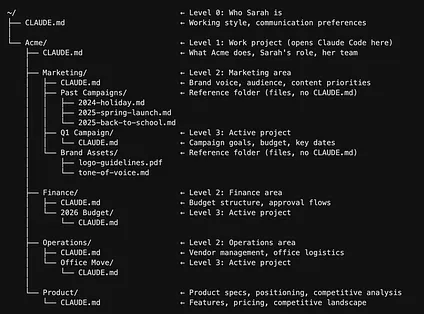
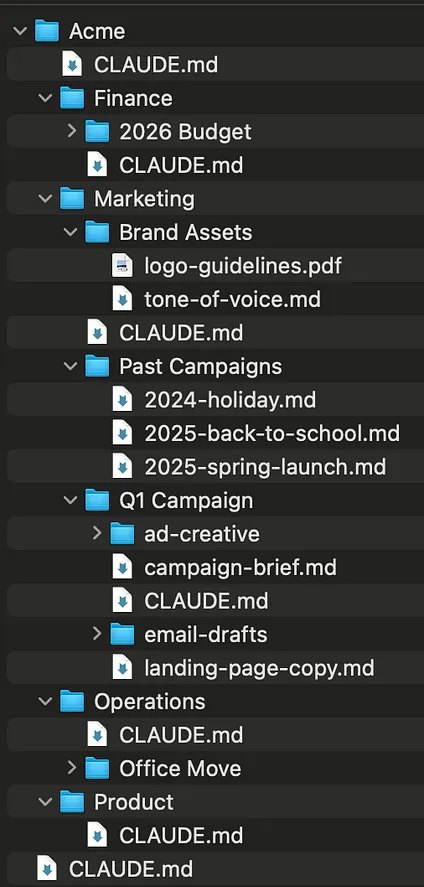
File system view 文件系统视图
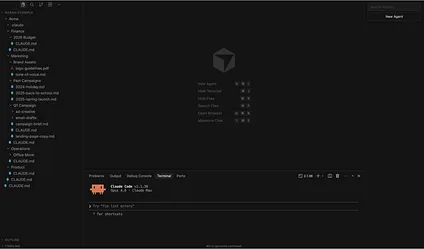
Cursor view 光标视图
The CLAUDE.md file at each level serves a distinct purpose:
每个级别的 CLAUDE.md 文件都有其独特的用途:
- Level 0: Top-level CLAUDE.md (~/ CLAUDE.md) is about how you work. Writing preferences, communication style, and formatting preferences. This is portable - it follows you everywhere, even if you change jobs.
Level 0:顶层 CLAUDE.md (~ / CLAUDE.md) 关注你的工作方式。写作偏好、沟通风格和格式偏好。这是可移植的——无论你更换工作,它都将伴随你。 - Level 1: Company CLAUDE.md (~/Acme/CLAUDE.md) is about what you do here. Your role, your team, and what areas exist. This is where you put team context so Claude knows who “Lisa” is when you say “Lisa thinks we should push the launch.”
Level 1:公司 CLAUDE.md (~ / Acme / CLAUDE.md) 关注你在公司做什么。你的角色、你的团队以及存在哪些领域。在这里,你可以放入团队的背景信息,以便当你说“Lisa 认为我们应该推进发布”时,Claude 知道“Lisa”是谁。 - Level 2: Area CLAUDE.md (~/Acme/Marketing/CLAUDE.md) is domain-specific context. Brand voice for marketing, budget structure for finance, and vendor processes for operations.
二级:CLAUDE.md 区域(~/Acme/Marketing/CLAUDE.md)是领域特定的上下文。例如,用于营销的品牌语调、用于财务的预算结构以及用于运营的供应商流程。 - Level 3: Project CLAUDE.md (~/Acme/Marketing/Q1 Campaign/CLAUDE.md) is the specific thing you’re working on right now. Goals, timeline, key decisions, and current status.
三级:CLAUDE.md 项目(~/Acme/Marketing/Q1 Campaign/CLAUDE.md)是您目前正在处理的具体事项。例如,目标、时间表、关键决策和当前状态。
Not every folder in your structure needs a CLAUDE.md file. Notice in the tree above: within Marketing, there are two kinds of folders. Q1 Campaign has a CLAUDE.md file - that context loads automatically whenever Sarah works there. But Past Campaigns and Brand Assets are just folders full of files, with no CLAUDE.md. When Sarah is working on a marketing project, those three past campaign briefs don’t automatically load and eat up thinking room. But Claude knows they’re there because of the folder structure, and can read them on demand when Sarah asks for inspiration. Best of both worlds.
并非您结构中的每个文件夹都需要 CLAUDE.md 文件。请注意上图所示的目录树:在 Marketing 文件夹内,有两种文件夹。Q1 Campaign 文件夹有一个 CLAUDE.md 文件——每当 Sarah 在那里工作时,该上下文都会自动加载。但 Past Campaigns 和 Brand Assets 只是包含文件的文件夹,没有 CLAUDE.md。当 Sarah 在做一个营销项目时,这三个过去的活动简报不会自动加载并占用思考空间。但 Claude 知道它们的存在,因为有文件夹结构,并且可以在 Sarah 请求灵感时按需阅读它们。这是两全其美的方法。
Rule of thumb: Only create a CLAUDE.md when you have context that’s (1) specific to that level and (2) needed across multiple sessions. A folder with just reference files (like Past Campaigns) doesn’t need one - Claude can read those on demand when you ask. A folder where you’re actively working on something with ongoing context (like Q1 Campaign) probably does. This distinction matters because every word loaded into context costs thinking room - if you create a CLAUDE.md in every single folder, you’ll load a wall of unnecessary context every session, defeating the whole purpose.
经验法则:仅当您拥有(1)特定于该层级且(2)在多个会话中都需要上下文时,才创建 CLAUDE.md。仅包含参考文件的文件夹(如 Past Campaigns)不需要 CLAUDE.md - Claude 可以在您要求时按需读取它们。您正在积极处理具有持续上下文的某个内容的文件夹(如 Q1 Campaign)则可能需要。这种区别很重要,因为加载到上下文中的每个单词都会占用思考空间——如果您在每个文件夹中都创建一个 CLAUDE.md,您将在每次会话中加载大量不必要的上下文,从而违背了整个目的。
How to tell if you’ve loaded too much: If you’ve set up the status line, keep an eye on your context usage as you work. As Claude navigates to different folders in your project, it loads the relevant CLAUDE.md files along the way - and you can watch your context usage climb. Remember, output quality starts to degrade around 50% context usage - so if your CLAUDE.md files alone are pushing you to 10-15% before you’ve even started working, they’re too heavy. The fix: shorten CLAUDE.md files that have grown too long, or remove CLAUDE.md files from folders that are just reference storage.
如何判断是否加载了过多内容:如果您设置了状态行,请在工作时留意您的上下文使用情况。当 Claude 导航到您项目中的不同文件夹时,它会加载相关的 CLAUDE.md 文件——您可以看到您的上下文使用量不断攀升。请记住,当上下文使用量达到 50% 左右时,输出质量会开始下降——因此,如果您的 CLAUDE.md 文件在您开始工作之前就已经占用了 10-15% 的使用量,那么它们就太重了。解决方法:缩短那些篇幅过长的 CLAUDE.md 文件,或者从仅用于参考存储的文件夹中移除 CLAUDE.md 文件。
If you’re not sure where to start trimming, Claude can help diagnose the problem:
如果您不确定从哪里开始修剪,Claude 可以帮助诊断问题:
Look at the CLAUDE.md files in this project. Are any of them too long, redundant, or loading context that I probably don’t need every session? Suggest how to trim them down.
查看此项目中的 CLAUDE.md 文件。有没有哪些文件太长、重复或加载了我可能不需要每次会话都加载的上下文?请提出修剪它们的建议。
Not sure how to organize your folders? You don’t need to have an existing folder structure or documents already saved on your computer. Many knowledge workers keep everything in Google Docs, Notion, or other cloud tools - the folders you’re setting up here are specifically for organizing your work with Claude Code. Go into plan mode and have Claude interview you about your work. Claude can help you think through how you work, what areas you cover, and what projects are active - then propose and create a folder structure that makes sense for you. Ask Claude:
不确定如何组织你的文件夹?你不需要现有的文件夹结构或已保存在计算机上的文档。许多知识工作者将所有内容保存在 Google Docs、Notion 或其他云工具中——你在这里设置的文件夹专门用于组织你与 Claude Code 的工作。进入计划模式,让 Claude 采访你关于你的工作。Claude 可以帮助你思考你的工作方式、你涵盖的领域以及哪些项目是活跃的——然后为你提出并创建一个有意义的文件夹结构。询问 Claude:
I want to set up folders in my workspace so I can use CLAUDE.md files to give you the right context for different areas of my work. Interview me about what I do, what areas I work in, and what projects I have. Then propose a folder structure. Once we agree, create the folders for me.
我想在我的工作区设置文件夹,以便我可以使用 CLAUDE.md 文件为我的不同工作领域提供正确的上下文。采访我,了解我的工作内容、我工作的领域以及我的项目。然后提出一个文件夹结构。一旦我们达成一致,请为我创建这些文件夹。
And don’t worry too much about getting the perfect setup on the first try. Your folder structure will evolve the longer you use Claude Code, and that’s completely normal. As you work more, you’ll naturally discover what context you actually need, what’s cluttering things up, and where new CLAUDE.md files would help. When that time comes, Claude can help you reorganize. At the end of a working session, when Claude has context about how you’ve been working:
不必过于担心一开始就设置得尽善尽美。随着您使用 Claude Code 时间越长,您的文件夹结构会不断演变,这是非常正常的。随着工作的深入,您会自然而然地发现自己真正需要的上下文是什么,哪些内容显得杂乱,以及在何处添加新的 CLAUDE.md 文件会有所帮助。届时,Claude 可以帮助您重新组织。在一个工作会话结束时,当 Claude 了解了您是如何工作的上下文后:
Based on the work we just did, does my folder structure or any of my CLAUDE.md files need to be updated or reorganized?
根据我们刚才完成的工作,我的文件夹结构或任何 CLAUDE.md 文件是否需要更新或重新组织?
Or at the start of a fresh session, when you just want a structural review:
或者在一个新的会话开始时,当您只是想进行结构审查时:
Look at my current folder structure and CLAUDE.md files. Is anything too long, redundant, or at the wrong level? Suggest how to reorganize.
查看我当前的文件夹结构和 CLAUDE.md 文件。有没有什么太长、冗余或层级不当的地方?请提出重组建议。
2. What actually belongs in a CLAUDE.md file2. CLAUDE.md 文件应包含哪些内容
The four types of information that make Claude noticeably more effective, how long each file should be, and what to leave out.
能让 Claude 显著提高效率的四种信息类型,每种文件应多长,以及应排除的内容。
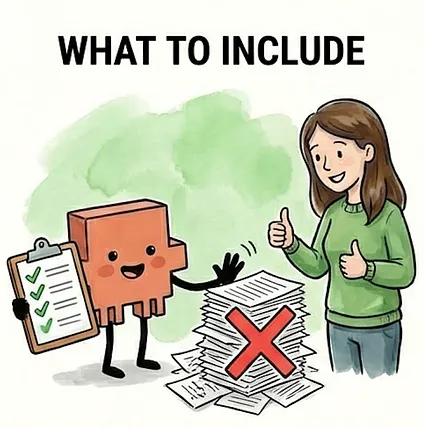
You’ve got your folder structure. Each folder level has a place for a CLAUDE.md file. But what actually goes in them?
你已经有了文件夹结构。每个文件夹层级都有一个 CLAUDE.md 文件的位置。但它们究竟应该包含什么内容呢?
The answer depends on the level. Remember, every word in a CLAUDE.md file costs thinking room - it loads every session you work in that folder. A top-level CLAUDE.md file with three screens of dense context is eating up space before you’ve even asked your first question. A project-level CLAUDE.md file that’s too sparse wastes the opportunity to give Claude the specific context it needs to be useful.
答案取决于层级。请记住,CLAUDE.md 文件中的每一个词都会占用思考空间——它会在你使用该文件夹的每个会话中加载。一个拥有三屏密集上下文的顶层 CLAUDE.md 文件,在你提出第一个问题之前就已经占用了大量空间。一个过于稀疏的项目级 CLAUDE.md 文件则浪费了为 Claude 提供使其有用的特定上下文的机会。
The general principle: higher levels should be shorter.
总体原则:层级越高,内容应越精简。
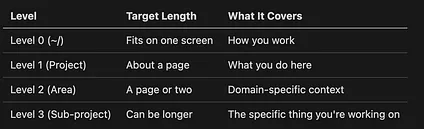
These aren’t hard rules - but if your top-level CLAUDE.md file is three pages long, it’s probably too heavy. And if your project-level CLAUDE.md file is two sentences, it’s probably not pulling its weight.
这些并非硬性规定——但如果你的顶层 CLAUDE.md 文件长达三页,那可能就太冗长了。反之,如果你的项目级 CLAUDE.md 文件只有两句话,那它可能就没起到应有的作用。
There’s a practical ceiling here, too. An instruction is any directive Claude needs to follow: “be concise and direct,” “for new campaigns, start by reviewing results from similar past campaigns,” or “budget over $5k needs Mike’s approval.” Each bullet point, each rule, and each preference counts. AI models can reliably follow roughly 150 to 200 of these at a time. Claude Code’s own system prompt, the built-in instructions that tell Claude how to behave before your CLAUDE.md files even load, already takes up about 50 of those. That leaves around 100 to 150 instructions spread across all of your CLAUDE.md files combined, and when you exceed that limit, instruction-following quality doesn’t just degrade for the newest additions. It degrades across the board. Every instruction gets a little less reliable. This is why keeping CLAUDE.md files lean isn’t just about saving context space. It’s about keeping Claude sharp on the instructions that actually matter.
这里也有一个实际的上限。指令是 Claude 需要遵循的任何指示:“简洁明了”、“对于新活动,首先回顾类似过往活动的成果”或“预算超过 5000 美元需要 Mike 的批准”。每一个要点、每一条规则和每一个偏好都很重要。AI 模型一次可以可靠地遵循大约 150 到 200 条指令。Claude Code 自身的系统提示(在您的 CLAUDE.md 文件加载之前就告诉 Claude 如何行为的内置指令)已经占用了大约 50 条。这样一来,您所有的 CLAUDE.md 文件加起来还有大约 100 到 150 条指令的空间,当您超出这个限制时,指令遵循的质量不仅仅是针对新添加的内容有所下降。而是全面下降。每一条指令都会变得稍微不那么可靠。这就是为什么保持 CLAUDE.md 文件精简不仅仅是为了节省上下文空间。这是为了让 Claude 能够敏锐地遵循那些真正重要的指令。
If you’re not sure where you stand, you can ask Claude to check:
如果你不确定自己的立场,可以问问 Claude 寻求确认:
Read all the CLAUDE.md files loaded in this project and count the number of distinct instructions, rules, and preferences. How close am I to the 150 instruction limit?
阅读此项目中加载的所有 CLAUDE.md 文件,并计算不同的指令、规则和偏好的数量。我距离 150 条指令的限制还有多远?
If you’re not sure what belongs in a CLAUDE.md file, start by including what you find yourself repeating at the beginning of sessions. The context you re-explain every time is the context that should be there permanently. You don’t need to get this right on the first try - include what feels relevant, use it for a few sessions, and trim what Claude never actually needed. The file is a text file, not a contract. You can edit it anytime.
如果你不确定 CLAUDE.md 文件应该包含什么,可以先把你每次会话开始时重复的内容写进去。你每次都需要重新解释的上下文,就是应该永久保留的上下文。你不必第一次就写对——包含你觉得相关的内容,使用几个会话,然后删掉 Claude 实际上并不需要的内容。这个文件只是一个文本文件,不是合同。你可以随时编辑它。
You won’t be writing these from scratch - Claude does most of the heavy lifting there, and we’ll cover how in the next section. For now, here’s what each CLAUDE.md file should contain. These recommendations are geared toward knowledge work - if you’re a developer, your CLAUDE.md files will look different.
你不需要从零开始编写这些内容——Claude 会在那里完成大部分工作,我们将在下一节介绍如何操作。现在,这里是每个 CLAUDE.md 文件应该包含的内容。这些建议是针对知识工作者的——如果你是开发者,你的 CLAUDE.md 文件看起来会有所不同。
Four types of information make Claude noticeably more effective:
Claude 能更有效地工作,主要得益于四类信息:
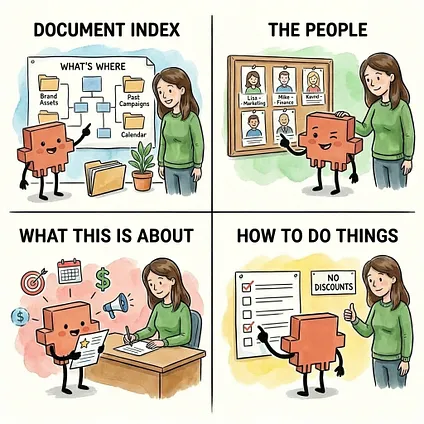
1. A document index: a map of what’s where.1. 文档索引:一份“什么东西在哪里”的地图。
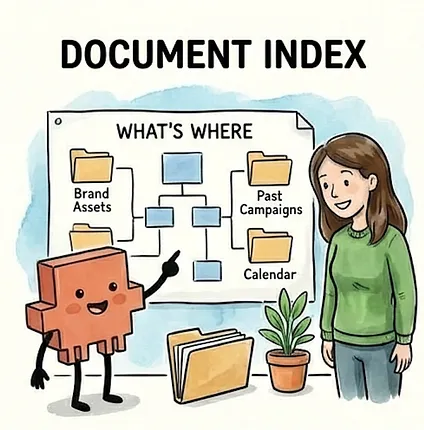
A document index is a quick reference that tells Claude what’s in the folder and where to find things. Instead of Claude searching blindly for your brand guidelines, the document index says: “Brand assets are in Brand Assets/. Past campaigns are in Past Campaigns/. The content calendar is content-calendar.md.” This is especially useful at the area and project levels, where Claude needs to navigate to the right files without guessing. Think of it like giving your junior employee a tour of the office on their first day - show them where things are so they’re not opening every drawer looking for the stapler. This also includes any external tools Claude can access through MCP servers, which are connections that let Claude talk directly to tools like Notion, Figma, or Slack. Documenting what each one connects to and when Claude should use it means you’re not re-explaining your tooling setup every session. (For a full walkthrough of setting up and documenting an MCP server, see the
文档索引是 Claude 快速了解文件夹内有什么以及在哪里可以找到这些内容的参考。文档索引告诉 Claude:“品牌资源在 Brand Assets/ 文件夹下。过往活动在 Past Campaigns/ 文件夹下。内容日历是 content-calendar.md。” 这在区域和项目级别尤为有用,Claude 需要在不猜测的情况下导航到正确的文件。这就像在第一天带一位新员工参观办公室一样——告诉他们东西在哪里,这样他们就不会翻遍每个抽屉去寻找订书机。这也包括 Claude 可以通过 MCP 服务器访问的任何外部工具,这些服务器是允许 Claude 直接与 Notion、Figma 或 Slack 等工具通信的连接。记录每个连接的工具以及 Claude 何时应该使用它,意味着您不必在每次会话中都重新解释您的工具设置。(要了解设置和记录 MCP 服务器的完整指南,请参阅 Notion article Notion 文章 in this series.) 在本系列中。)
There’s also a step beyond pointing Claude to files: importing them. You might already know that typing @ followed by a filename in Claude Code helps Claude find and read that specific file. The same syntax works inside CLAUDE.md files. Adding @./Brand Assets/tone-of-voice.md to your CLAUDE.md tells Claude to find that file and load its contents as part of your instructions — automatically, every session. A document index says “here’s where to find the brand guide if you need it.” An import says “the brand guide is part of your briefing, every session.”
除了让 Claude 指向文件之外,还有一个更进一步的步骤:导入文件。你可能已经知道,在 Claude Code 中键入 @ 后跟文件名可以帮助 Claude 查找并读取该特定文件。相同的语法也适用于 CLAUDE.md 文件。在 CLAUDE.md 中添加 @./Brand Assets/tone-of-voice.md 会告诉 Claude 查找该文件,并将其内容作为指令的一部分自动加载,每节课都会如此。文档索引表示“如果你需要品牌指南,它在这里”。导入表示“品牌指南是你的简报的一部分,每节课都是如此”。
You might wonder: if the imported file loads into context either way, why not just paste its contents directly into the CLAUDE.md? From Claude’s perspective, it’s the same — it all becomes context. The benefit is on the human side:
你可能会问:如果导入的文件无论哪种方式都会加载到上下文中,为什么不直接将其内容粘贴到 CLAUDE.md 中呢?从 Claude 的角度来看,它们是一样的——它们都变成了上下文。好处在于人类方面:
- Reuse. Sarah’s brand voice guide needs to be loaded in both her Marketing and Product folders, but not Finance or Operations. Without imports, she’d copy-paste the guide into both the Marketing CLAUDE.md and the Product CLAUDE.md — and update both every time the guide changes. With imports, both files point to the same tone-of-voice.md. She updates it once and every CLAUDE.md that imports it picks up the change.
复用。Sarah 的品牌声音指南需要同时加载到她的营销和产品文件夹中,但不能加载到财务或运营文件夹中。如果没有导入功能,她必须将指南复制粘贴到营销 CLAUDE.md 和产品 CLAUDE.md 中——每次指南发生变化时都要更新两者。有了导入功能,这两个文件都可以指向同一个 tone-of-voice.md 文件。她更新一次,所有导入它的 CLAUDE.md 都会自动更新。 - Readability. A 500-line CLAUDE.md becomes hard to scan and update, but breaking it into focused files — one for brand voice, one for approval workflows, one for team context — keeps the main CLAUDE.md short and scannable.
可读性。一个 500 行的 CLAUDE.md 文件会变得难以浏览和更新,但将其分解为几个专注的文件——一个用于品牌声音,一个用于审批工作流程,一个用于团队背景——可以让主 CLAUDE.md 文件保持简短和易于浏览。 - Modularity. Sarah’s Marketing CLAUDE.md can import the brand voice guide plus campaign workflows, while her Product CLAUDE.md imports the same brand voice guide plus competitive analysis conventions. Different combinations, one source of truth.
模块化。Sarah 的营销 CLAUDE.md 可以导入品牌声音指南以及营销活动工作流程,而她的产品 CLAUDE.md 可以导入相同的品牌声音指南以及竞争对手分析规范。不同的组合,一个信息源。
Just remember that imported files still cost context space - they load in full every session. If you’re importing a long file, consider creating a shorter summary version to import instead - one that contains truly only what’s needed in 80% of your sessions. You keep the single source of truth, just a leaner one. The full file still lives in the folder for Claude to read on demand when you need the details.
请记住,导入的文件仍然会占用上下文空间——它们会在每个会话中完全加载。如果您导入了一个很长的文件,请考虑创建一个更短的摘要版本来代替导入——一个只包含您在 80% 的会话中真正需要的内容的版本。您保留了单一的“事实来源”,只是一个更精简的版本。完整的文件仍然保存在文件夹中,以便在您需要细节时,Claude 可以按需读取。
2. The people involved.2. 涉及人员。
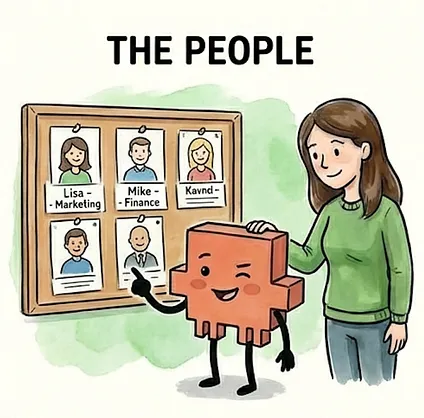
Names, roles, and what they do - at whatever level is relevant. Your company-level CLAUDE.md file doesn’t need every person at the company. But your project-level CLAUDE.md file should probably include your project team, because when you say “Lisa thinks we should push the launch,” Claude should know who Lisa is without you explaining it every session. This is the kind of context you’d put in an onboarding doc for a new team member - the basics they need to follow conversations.
姓名、职位以及他们所做的事情——在任何相关的层面上。您的公司级 CLAUDE.md 文件不需要包含公司里的每个人。但您的项目级 CLAUDE.md 文件可能应该包含您的项目团队,因为当您说“丽莎认为我们应该推迟发布”时,Claude 应该知道丽莎是谁,而不需要您在每次会话中都解释一遍。这是您会在新团队成员的入职文档中放入的上下文信息——他们需要了解的基本信息才能跟上谈话。
3. What this is about.3. 本文内容。

The identity, goals, and key facts that give Claude the background to do useful work. At the company level, this might be what your company does and your role. At an area level, it could be your brand voice and target audience. At a project level, it’s the specific goals, timeline, budget, and messaging. This is the context that turns Claude from a generic assistant into one that actually understands your work. Without it, you’re re-explaining the basics every session - “we’re a B2B SaaS company targeting mid-size teams” - instead of jumping straight into the real work.
Claude 的身份、目标和关键事实,能为它提供执行有用工作的背景信息。在公司层面,这可能指明贵公司是做什么的以及您的角色。在区域层面,这可能是您的品牌声音和目标受众。在项目层面,这包括具体的项目目标、时间表、预算和信息传达。这些背景信息能将 Claude 从一个普通的助手转变为一个真正理解您工作的助手。没有这些信息,您将在每次会话中都重新解释基本情况——“我们是一家面向中型团队的企业级 SaaS 公司”——而不是直接开始真正的工作。
4. How you want things done.4. 您希望如何完成工作。

Workflows, processes, preferences, and guardrails that shape how Claude works in this area. “For new campaigns, start by reviewing results from similar past campaigns.” “Budget over $2k needs my sign-off, over $5k needs Mike’s.” “Give me a plan before executing - I like to review your approach before you make changes.” This also includes constraints from decisions already made - if you’ve decided “we’re positioning as premium, no discounts,” putting that guardrail in the CLAUDE.md file prevents Claude from suggesting discount strategies every session. Without it, you’ll waste time re-explaining the same constraints. With it, Claude starts every session already aligned on your direction.
塑造 Claude 在此方面工作方式的工作流程、流程、偏好和防护栏。“对于新活动,首先查看过去类似活动的成果。”“预算超过 2000 美元需要我批准,超过 5000 美元需要 Mike 批准。”“在执行前给我一个计划——我喜欢在您做出更改之前查看您的方法。”这还包括已做出的决定的限制——如果您已决定“我们将定位为高端,不打折”,将该防护栏放入 CLAUDE.md 文件中可以防止 Claude 在每次会话中都建议折扣策略。没有它,您将浪费时间反复解释相同的限制。有了它,Claude 在每次会话开始时都能与您的方向保持一致。
These four categories aren’t a rigid template. Not every CLAUDE.md file needs all four. The goal isn’t to document everything you know - it’s to give Claude exactly what it needs to work effectively at each level.
这四个类别并非僵化的模板。并非每个 CLAUDE.md 文件都需要这四项。目标并非记录你所知的一切,而是为 Claude 提供它在各个层级有效工作所需的一切。
A natural question: what about you - your personality, your values, your professional background? These can be useful, but only when they translate to something Claude can act on. “I’m detail-oriented” is wasted context - it’s a personality trait, not an instruction. “Double-check all numbers and calculations before presenting them” is an instruction Claude can follow. Same with professional background: you don’t need your full LinkedIn profile in your CLAUDE.md. But “I have 15 years of marketing experience - don’t explain basic marketing concepts” saves you from getting Marketing 101 explanations every session. The test is always the same: does including this change how Claude works with you? If yes, include it. If it’s just nice-to-know, skip it.
一个自然的问题:关于你——你的个性、你的价值观、你的职业背景呢?这些可能很有用,但前提是它们能转化为 Claude 可以据此采取行动的内容。“我注重细节”是无效的上下文——它是一种个性特征,而不是指令。而“在呈现数字和计算之前,请仔细检查所有数字和计算”是 Claude 可以遵循的指令。职业背景也是同理:你的 CLAUDE.md 文件中不需要你的完整 LinkedIn 个人资料。但“我有 15 年的营销经验——不要向我解释基本的营销概念”可以让你在每次会话中都免于收到市场营销 101 的解释。测试永远是一样的:包含这些信息是否会改变 Claude 与你的合作方式?如果会,就包含它。如果只是锦上添花,那就跳过。
What doesn’t belong:不应该包含的内容:
- Passwords, API keys, or anything sensitive
密码、API 密钥或任何敏感信息 - Context that belongs at a different level (don’t repeat company-wide info in every project CLAUDE.md file)
不应在每个项目 CLAUDE.md 文件中重复公司级信息 - Information that changes so frequently it’ll be outdated by your next session
信息会频繁变动,以至于在你下次会话时就已过时 - Templates (email formats, brief structures, PRD outlines, slide frameworks)
模板(邮件格式、简报结构、PRD 大纲、幻灯片框架)
The first two are straightforward. The third is worth explaining: if your project status changes every few days, putting it in a CLAUDE.md file means it’ll be stale by the next session. Better to update Claude in the moment - “here’s where we are on the campaign” - than to load outdated context automatically.
前两点很直接。第三点值得解释一下:如果你的项目状态每几天就会变化一次,将其放入 CLAUDE.md 文件意味着它在你下次会话时就会过时。最好是即时更新 Claude——“这是我们在营销活动中的进展”——而不是自动加载过时的上下文。
The fourth is a common instinct, especially if you’re a knowledge worker who’s been trained on templates for everything - campaign briefs, status updates, forecasting models, email formats. Templates feel important enough to always have loaded, but they’re usually long and you only need a specific one when you’re actually creating that type of document. A three-page campaign brief template eating thinking room while you’re drafting an email is wasted context. The better home for templates is custom slash commands and skills, which let you load a template on demand when you need it. (We’ll cover these later in the series.)
第四个是一种常见的本能,特别是如果你是一名知识工作者,习惯了为一切事情(如活动简报、状态更新、预测模型、电子邮件格式)都使用模板。模板似乎很重要,所以总是需要加载,但它们通常很长,而你实际上只在创建该类型文档时才需要特定的模板。当你在起草电子邮件时,一个占用思考空间的、长达三页的活动简报模板就是一种浪费。模板更好的归宿是自定义斜杠命令和技能,它们允许你在需要时按需加载模板。(我们将在本系列后面的内容中介绍这些。)
A good litmus test for everything in your CLAUDE.md files: if a piece of context isn’t relevant to the vast majority of sessions where that file loads, it doesn’t belong there. Move it to a separate file that Claude can read when you ask, or into a custom slash command you run when you need it. Your CLAUDE.md files should contain the context you need every time, not the context you might need sometimes.
一个很好的检验 CLAUDE.md 文件中所有内容的标准:如果某个上下文信息与该文件加载的大多数会话都无关,那么它就不属于那里。将其移至另一个 Claude 可以在你询问时读取的文件,或者移至你需要在需要时运行的自定义斜杠命令中。你的 CLAUDE.md 文件应该包含你每次都需要的内容,而不是你偶尔可能需要的内容。
3. How to write CLAUDE.md files3. 如何编写 CLAUDE.md 文件
Three methods for having Claude draft your CLAUDE.md files for you - whether you’re starting from scratch, from existing docs, or from a working session you just finished.
让 Claude 为您起草 CLAUDE.md 文件的三种方法——无论您是从头开始,从现有文档开始,还是从刚刚完成的工作会话开始。

Claude is surprisingly good at writing its own CLAUDE.md files. You provide the raw material - documents, conversation, or answers to questions - and Claude organizes it into a structured file that captures the context it needs. You review the output, cut what doesn’t belong, and add anything Claude missed. The result is better than either of you would produce alone: Claude catches context you’d forget to document, and you catch context Claude shouldn’t have included.
Claude 在编写自己的 CLAUDE.md 文件方面表现出人意料地出色。您提供原始材料——文档、对话或问题的答案——Claude 会将其组织成一个捕获其所需上下文的结构化文件。您审查输出,删除不必要的内容,并添加 Claude 遗漏的任何内容。结果比你们任何一方单独产生的都要好:Claude 会捕捉到您会忘记记录的上下文,而您会捕捉到 Claude 不应该包含的上下文。
One detail to get right up front: the filename must be exactly CLAUDE.md - all caps. claude.md or Claude.md won’t load.
首先需要明确的一个细节:文件名必须是 CLAUDE.md——全部大写。claude.md 或 Claude.md 将无法加载。
Here are three methods for writing CLAUDE.md files that work well for knowledge workers.
以下是为知识工作者量身定制的、行之有效的 CLAUDE.md 文件编写三种方法。
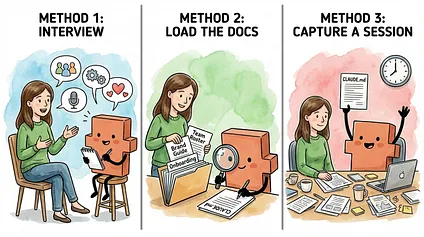
Method 1: Plan mode interview方法一:规划模式访谈
Use when you have context in your head but no docs
适用于您心中已有上下文但没有文档的情况
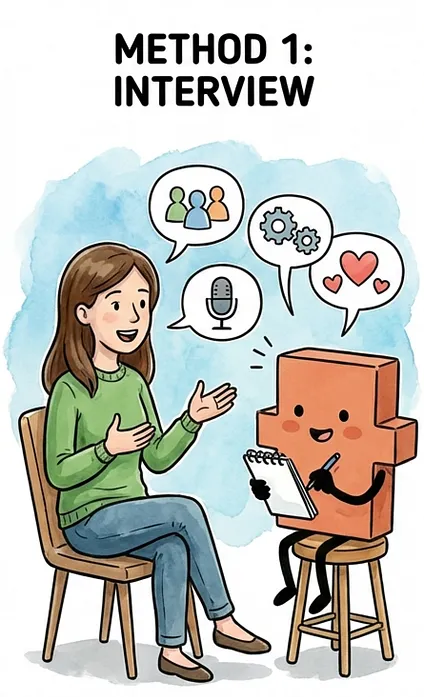
This one is for when the context lives in your head but isn’t written down anywhere. Maybe you have a new role and haven’t documented your team or processes yet. Maybe you have years of institutional knowledge that’s never been captured in a file. You know the information - you just need help getting it out.
这种方法适用于上下文存在于您的脑海中但并未记录在任何地方的情况。也许您刚上任,还没有记录下您的团队或流程。也许您拥有多年的机构知识,但这些知识从未被记录在文件中。您知道这些信息——您只是需要帮助将其提取出来。
If you used plan mode to design your folder structure earlier in this article, this is the same approach for a different goal. Switch to plan mode (Shift+Tab) and let Claude interview you:
如果您在本文前面部分使用计划模式设计了文件夹结构,那么这是一种用于不同目标的相同方法。切换到计划模式(Shift+Tab),让 Claude 采访您:
I want to generate a CLAUDE.md file for [folder name]. Interview me to understand what you’d need to work effectively there. Ask me questions about the project, the people involved, and how I want things done. Then draft the file based on my answers.
我希望为 [文件夹名称] 生成一个 CLAUDE.md 文件。请采访我,以了解您在那里有效工作需要了解的内容。就项目、相关人员以及我希望如何完成工作向我提问。然后根据我的回答起草文件。
Claude will start asking questions. Who’s on the team? What are the goals? What decisions have already been made? What workflows do you follow? How do you want to work? Answer conversationally - dictating with a tool like Wispr Flow is much faster than typing, and your natural speech patterns often capture context more completely than careful typing does. You’ll mention things off the cuff that you’d forget to include if you were writing from scratch.
Claude 将开始提问。团队有哪些成员?目标是什么?已经做出了哪些决定?您遵循哪些工作流程?您希望如何工作?以对话的方式回答——使用 Wispr Flow 等工具进行口述比打字要快得多,而且您自然的说话方式通常比仔细打字更能完整地捕捉上下文。您会随意提到一些事情,而这些事情如果您从头开始写,可能会忘记包含进去。
Sarah uses this method for her top-level CLAUDE.md file - the one in her home folder that captures how she works. There’s no document that describes her working style. It’s all in her head: she likes to review a plan before Claude executes, she prefers bullet points over paragraphs, and she wants two or three options with trade-offs rather than a list of ten. Claude asks her about communication preferences, formatting, and how she likes to give and receive feedback. Sarah answers off the cuff, mentions things she wouldn’t have thought to write down - like that she always wants tables for comparisons, or that she hates corporate jargon. Claude drafts the CLAUDE.md, and Sarah has a preferences file she never would have written from scratch.
Sarah 在她顶层的 CLAUDE.md 文件中使用了这种方法——也就是她主文件夹中那个记录她工作方式的文件。没有任何文档能描述她的工作风格。这一切都印在她脑子里:她希望 Claude 执行前先审查计划,她偏爱项目符号而非段落,并且她想要带有权衡取舍的二三个选项,而不是列出十个。Claude 会询问她沟通偏好、格式以及她喜欢如何给予和接收反馈。Sarah 随口回答,提到了一些她本不会想到要写下来的事情——比如她总是想要表格来进行比较,或者她厌恶公司术语。Claude 起草了 CLAUDE.md,而 Sarah 则拥有了一个她自己绝不会从零开始写就的偏好文件。
Plan mode is important here because it keeps Claude in exploration mode. Without plan mode, Claude tends to generate a CLAUDE.md file after your first or second answer - and the result is too thin to be useful. Plan mode tells Claude to keep asking, keep refining its understanding, and only propose the file once it has the full picture. After several rounds of questions, Claude drafts the CLAUDE.md file. Review it, adjust anything that’s not quite right, and save.
在此使用计划模式至关重要,因为它能让 Claude 保持探索模式。如果没有计划模式,Claude 往往会在您回答一两次后就生成 CLAUDE.md 文件——结果过于粗浅,毫无用处。计划模式指示 Claude 要持续提问,不断完善其理解,直到掌握全局后再提议创建文件。经过多轮提问后,Claude 将起草 CLAUDE.md 文件。请审阅该文件,调整任何不准确之处,然后保存。
Method 2: Load the docs, then generate方法二:加载文档,然后生成
Use when you have existing documents for this area
适用于已有该领域的文档时
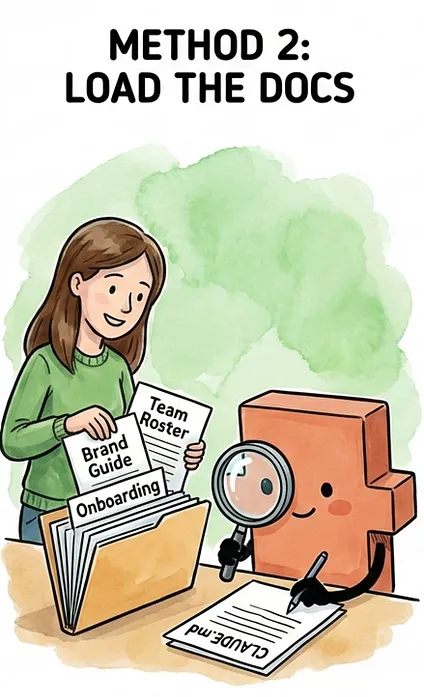
Remember the folder structure from the previous section - each level has a place for a CLAUDE.md file, and surrounding folders hold the reference files Claude can read on demand. If you already have documents that capture most of what Claude needs to know at a given level - project briefs, team wikis, brand guidelines, strategy decks, or process docs - start by saving them into the right folders in your structure. These files will live there permanently, so Claude can reference them in future sessions whenever you ask.
请记住上一节的文件夹结构——每一层都有一个 CLAUDE.md 文件的位置,而周围的文件夹则存放着 Claude 可按需读取的参考文件。如果您已经拥有了能够充分捕捉 Claude 在特定级别所需的大部分信息的文档——项目简报、团队维基、品牌指南、战略演示文稿或流程文档——请首先将它们保存在您结构中的正确文件夹里。这些文件将永久保存在那里,以便您将来在任何时候向 Claude 提问时,Claude 都可以参考它们。
Once the relevant docs are in place, ask Claude to read through them and generate a CLAUDE.md for that level:
将相关文档准备好后,请 Claude 阅读它们并为该级别生成一个 CLAUDE.md 文件:
Read through the files in [folder name] and generate a CLAUDE.md file for that folder. Focus on what you’d need to know to work effectively there: what this is, who’s involved, key decisions that have been made, and where to find things.
请阅读 [文件夹名称] 中的文件,并为该文件夹生成一个 CLAUDE.md 文件。请侧重于您在此高效工作所需了解的内容:这是什么,谁参与其中,已做出的关键决策,以及在哪里可以找到相关信息。
Here’s what this looks like for Sarah. She wants to create her company-level CLAUDE.md file - the one that tells Claude what Acme does, who’s on the team, and what areas exist. She has a team roster and a one-pager about the company she used for onboarding. She saves them into her Acme folder, then asks Claude to read through them and draft the CLAUDE.md.
以下是 Sarah 的情况。她想创建公司级别的 CLAUDE.md 文件——这份文件告诉 Claude Acme 公司是做什么的、团队成员都有谁以及存在哪些部门。她有一个团队名单和一个关于公司情况的单页介绍,她之前在入职时使用过。她将这些文件保存在 Acme 文件夹中,然后要求 Claude 阅读它们并起草 CLAUDE.md。
Claude produces a draft. It’s a solid starting point, but it needs editing. Claude pulled in too much detail from the onboarding doc - a full company history section that isn’t relevant to most sessions. But it nailed the team section - names, roles, and who reports to whom - and correctly identified the folder structure with Marketing, Finance, Operations, and Product as the key areas. Sarah tells Claude to trim the company history down to two sentences and add a line about approval workflows she knows from experience but hadn’t documented. A few prompts of back and forth, and the CLAUDE.md file is done.
Claude 生成了一个草稿。这是一个很好的起点,但需要进行编辑。Claude 从入职文件中提取了过多的细节——一个对大多数会话都不相关的完整公司历史部分。但它在团队部分做得很好——姓名、职位以及谁向谁汇报——并且正确地识别了文件夹结构,将市场部、财务部、运营部和产品部作为关键部门。Sarah 告诉 Claude 将公司历史缩减到两句话,并添加一条关于她根据经验知道但尚未记录的审批流程的说明。经过几次来回的提示,CLAUDE.md 文件就完成了。
The key with this method: save the docs that belong at that level into the right folder, not everything you have into one place. Company-level docs - team rosters, onboarding guides - go in the company folder. Marketing docs - brand voice guide, audience research, campaign process - go in the Marketing folder. When you generate the CLAUDE.md, Claude reads what’s in the folder and drafts from the right material. Same principle as the CLAUDE.md files themselves: more isn’t better, right is better.
这种方法的关键:将属于特定层级的文档保存在正确的文件夹中,而不是将所有内容都放在一个地方。公司层级的文档——团队名单、入职指南——存放在公司文件夹中。营销文档——品牌声音指南、受众研究、营销活动流程——存放在营销文件夹中。当你生成 CLAUDE.md 时,Claude 会读取文件夹中的内容并从正确的材料中起草。这与 CLAUDE.md 文件本身遵循相同的原则:内容多不一定好,内容对才好。
Method 3: Generate from a session方法 3:从一次会话中生成
Use when you just finished a working session
在刚刚结束一次工作会话时使用
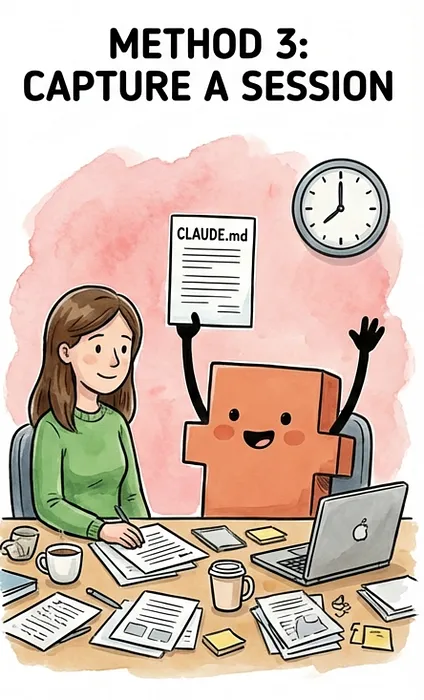
Sometimes the best context comes from doing the work itself. You spend an hour with Claude researching competitors, drafting a campaign brief, or building a budget model - and by the end of the session, Claude has absorbed a ton of context about your project through the conversation. Who’s involved, what the goals are, what decisions you’ve made, and what constraints exist. All of it came up naturally while you were working.
有时,最佳的上下文来自实际工作本身。你花一小时与 Claude 一起研究竞争对手、起草营销活动简介或构建预算模型——在会话结束时,Claude 通过对话吸收了你项目的大量上下文。谁参与其中、目标是什么、你做出了哪些决定以及存在哪些限制。所有这些内容都是在你们工作过程中自然产生的。
The question to ask yourself: will future sessions in this folder need the same context? If you’re going to keep working on this campaign, this budget, or this project across multiple sessions - that’s when it’s worth capturing. If it was a one-off task you won’t revisit, you probably don’t need a CLAUDE.md file for it.
你需要问自己的问题是:这个文件夹中的后续会话是否需要相同的上下文?如果你要在多个会话中继续处理这项活动、这项预算或这个项目——那么这时就值得将其记录下来。如果这是一次性任务,你不会再回头处理,那么你很可能不需要为它创建 CLAUDE.md 文件。
When the answer is yes, that’s the perfect moment to capture it:
当答案是肯定的,那就是记录它的绝佳时机:
We just did a lot of work in this area. Generate a CLAUDE.md file for this folder based on everything we covered. Focus on context that would be useful at the start of any future session here, and ask me about any context you’re not sure is relevant to future work.
我们在这一领域已经做了大量工作。请根据我们讨论的所有内容,为这个文件夹生成一个 CLAUDE.md 文件。重点关注在后续任何会话开始时可能对在这里的工作有用的上下文,并询问我任何你不确定是否与未来工作相关的上下文。
This method works especially well when you’re starting something new. Say Sarah spends a session brainstorming the Q2 marketing campaign with Claude. They talk through goals, channels, messaging angles, and budget allocation. By the end, Claude knows this is a content-focused campaign targeting existing customers, that Lisa will lead execution, and that the budget is tighter than Q1. None of that exists in a document yet - it all came out through the conversation. Sarah asks Claude to create a Q2 Campaign folder in Marketing and generate a CLAUDE.md file for it. Now the next time she works on the Q2 campaign, all of that context is waiting for her.
这个方法在你开始新项目时尤其有效。假设 Sarah 和 Claude 一起进行了一个关于第二季度营销活动的头脑风暴。她们讨论了目标、渠道、宣传角度和预算分配。最后,Claude 得知这是一个针对现有客户的内容营销活动,由 Lisa 负责执行,并且预算比第一季度更紧张。这一切都还没有形成文档,而是通过对话产生的。Sarah 要求 Claude 在“Marketing”文件夹下创建一个“Q2 Campaign”文件夹,并为它生成一个 CLAUDE.md 文件。这样,下次她进行第二季度营销活动时,所有的背景信息都已备妥。
Ideally, do this before you close the session. If you close the terminal without saving the context and haven’t named the session in a way that makes it easy to find, all of that context is gone - and you’re back to re-explaining everything from scratch. If you do forget, you can resume a named session later and generate the CLAUDE.md then. But the easiest path is to capture it at the end of the session, when Claude already has the full picture.
最好在结束会话前完成。如果你在未保存上下文的情况下关闭终端,并且没有为会话命名以便于查找,那么所有的上下文信息都会丢失——你将不得不从头开始重新解释一切。如果你确实忘记了,之后你可以恢复一个已命名的会话,然后生成 CLAUDE.md 文件。但最简单的方法是在会话结束时捕获这些信息,因为那时 Claude 已经掌握了全部信息。
One thing to watch for: Claude may include context that was relevant to this session but won’t matter in future ones. If you spent twenty minutes debugging a specific email draft, Claude might include details about that draft in the CLAUDE.md file. Cut anything that’s about the current task rather than the ongoing project. The CLAUDE.md file should capture the durable context - the stuff that’s true across sessions - not a summary of today’s work.
需要注意的一点是:Claude 可能会包含与本次会话相关但对后续会话无关紧要的上下文。如果您花了二十分钟调试某个特定的电子邮件草稿,Claude 可能会在 CLAUDE.md 文件中包含该草稿的详细信息。删除任何与当前任务有关的内容,而不是与正在进行的项目有关的内容。CLAUDE.md 文件应捕获持久的上下文——跨会话都适用的内容——而不是当日工作的摘要。
Pick whichever method matches where you are right now and start with the area or project where you’re using Claude Code the most. You don’t need CLAUDE.md files across your entire folder structure before you start seeing results. One CLAUDE.md file in your most active project folder and you’ll immediately feel the difference.
选择适合您当前情况的任何一种方法,并从您使用 Claude Code 最多的区域或项目开始。您不需要在开始看到结果之前就在整个文件夹结构中拥有 CLAUDE.md 文件。在您最活跃的项目文件夹中创建一个 CLAUDE.md 文件,您将立即感受到差异。
Whichever method you use, the same principle applies: what Claude produces is a starting point, not a finished product. Review every line against the litmus test from the previous section: if a piece of context isn’t relevant to the vast majority of sessions where that file loads, cut it or move it to a separate file Claude can read on demand. Remember, every CLAUDE.md file that loads for a session shares the same budget of around 100 to 150 instructions - so every line you add to one file leaves less room for the others. A lean CLAUDE.md file that Claude follows reliably is better than a comprehensive one where every instruction gets a little less sharp.
无论你使用哪种方法,同样的原则都适用:Claude 生成的内容是起点,而不是最终产品。对照上一节的“试金石”原则,审查每一行:如果某个上下文信息与加载该文件的绝大多数会话无关,就将其删除或移动到 Claude 可以按需读取的单独文件中。记住,每次会话加载的每个 CLAUDE.md 文件都共享相同的预算,大约在 100 到 150 条指令之间——所以你为某个文件添加的每一行都会为其他文件留下更少的空间。一个 Claude 能够可靠遵循的精简 CLAUDE.md 文件,比一个包罗万象但每条指令的准确性都稍有下降的文件要好。
One more tip that applies to all three methods: You speak 3-4x faster than you type. If you use a dictation tool like Wispr Flow, you can answer Claude’s questions, describe your workflows, and brain-dump context at the speed of speech instead of the speed of typing.
还有一个适用于所有这三种方法的小贴士:你的语速是打字速度的 3-4 倍。如果你使用 Wispr Flow 这样的语音输入工具,你就可以用说话的速度而不是打字的速度来回答 Claude 的问题、描述你的工作流程以及倾倒背景信息。
A note for developers: Claude Code also has a /init command that generates a CLAUDE.md file by analyzing your folder structure and codebase. It works well for technical projects with clear organization. For knowledge work, Methods 1-3 tend to produce better results - /init generates generic structural context that misses what actually matters for knowledge workers: your role, your team, key decisions, and how you want things done.
给开发人员的一点说明:Claude Code 还有一个 ` /init ` 命令,它通过分析你的文件夹结构和代码库来生成 CLAUDE.md 文件。这对于具有清晰组织结构的技木项目效果很好。对于知识型工作,方法 1-3 往往能产生更好的结果——` /init ` 生成的是通用的结构化上下文,它忽略了对知识工作者真正重要的东西:你的角色、你的团队、关键决策以及你希望如何完成工作。
4. Keeping CLAUDE.md files lean over time4. 随着时间的推移保持 CLAUDE.md 文件精简
Your CLAUDE.md files will grow. Here’s how to catch the bloat before it starts hurting your output quality - and when to check in.
您的 CLAUDE.md 文件会不断增长。以下是如何在文件膨胀影响输出质量之前进行补救,以及何时进行检查。
CLAUDE.md files aren’t something you set up once and forget about. Your work evolves - projects wrap up, new ones start, team members change, and processes get refined. The CLAUDE.md files should evolve with it.
CLAUDE.md 文件不是您设置一次就能置之不理的文件。您的工作会不断发展——项目会结束,新的项目会开始,团队成员会变化,流程会得到优化。CLAUDE.md 文件也应该随之发展。
The good news: maintenance is easy, because Claude does the heavy lifting here too. The key is building the habit of checking in on your CLAUDE.md files at two natural moments.
好消息是:维护很简单,因为 Claude 在这里也承担了繁重的工作。关键在于养成在两个自然的时间点检查 CLAUDE.md 文件的习惯。
After a big working session: You just spent an hour with Claude making decisions, refining strategy, or changing direction on a project. Before you close the session, ask:
一次大型工作会话后:您刚花了一个小时与 Claude 一起做决定、制定战略或调整项目方向。在结束会话之前,问自己:
Based on the work we just did, does the CLAUDE.md for [folder name] need to be updated with any new context?
基于我们刚才完成的工作,[文件夹名称] 的 CLAUDE.md 是否需要用新的上下文进行更新?
Claude already has the full picture of what changed - it can identify what’s worth capturing and propose specific updates. You review, approve what makes sense, and move on. This is easier than trying to remember what changed a week later.
Claude 已经完全了解了发生了什么变化——它可以识别值得记录的内容并提出具体的更新。你进行审查,批准合理的部分,然后继续。这比过一周后再试图回忆发生了什么要容易得多。
When you keep re-explaining the same thing: If you find yourself giving Claude the same context at the start of every session - who someone is, what a project is about, how you want something done - that context belongs in a CLAUDE.md file. Tell Claude to add it:
当你反复解释同一件事时:如果你发现自己每开始一次对话都要给 Claude 提供相同的上下文——某人是谁,一个项目是关于什么的,你希望某事如何完成——那么这个上下文就应该放在 CLAUDE.md 文件中。告诉 Claude 添加它:
I keep having to explain [X] every session. Update the CLAUDE.md for [folder name] so you have that context automatically.
我每开始一次对话都得解释 [X]。更新 [文件夹名称] 的 CLAUDE.md,以便你能够自动获得该上下文。
One thing to know about timing: CLAUDE.md files load when a session starts, not continuously. If you edit a CLAUDE.md file in the middle of a session, Claude won’t see the changes automatically. You have three options:
关于加载时机需要了解的一点是:CLAUDE.md 文件会在会话开始时加载,而不是持续加载。如果你在会话进行中编辑 CLAUDE.md 文件,Claude 不会自动看到更改。你有三种选择:
- Ask Claude to reread the file (”Reread the CLAUDE.md in this folder”)
要求 Claude 重新读取文件(“重新读取此文件夹中的 CLAUDE.md”) - Run
/clearto reset the session (which reloads all CLAUDE.md files)
运行/clear重置会话(这将重新加载所有 CLAUDE.md 文件) - Start a new session 开启一个新会话
The easiest approach is to make your updates at the end of a session, so the next session picks them up naturally.
最简单的方法是在会话结束时进行更新,这样下一个会话就能自然地接收到这些更新。
Signs a CLAUDE.md file needs trimming:
CLAUDE.md 文件需要精简的迹象:
- It’s noticeably longer than it was when you created it. CLAUDE.md files tend to grow over time as you add context after sessions. Periodically check if everything still earns its place.
它比你创建它的时候明显长了很多。CLAUDE.md 文件会随着你在会话后添加上下文而随着时间推移而增长。定期检查是否所有内容都仍然有价值。 - It contains details about finished projects or past decisions that no longer affect current work. If the Q1 campaign is over but its CLAUDE.md file still has the timeline, budget breakdown, and launch event details, that’s dead context loading every time you navigate through that folder.
它包含有关已完成项目或不再影响当前工作的过去决定的详细信息。如果第一季度的活动已经结束,但其 CLAUDE.md 文件仍然包含时间线、预算明细和发布活动详情,那么每次导航到该文件夹时,这些已失效的上下文都会被加载。 - It has detailed context about multiple different projects. If Sarah’s Marketing CLAUDE.md has grown to include specific goals, timelines, and messaging for both the Q1 campaign and a separate product launch, that context should live in its own CLAUDE.md file inside each project’s folder - not in the area-level file that loads for all marketing work.
它包含关于多个不同项目的详细上下文。如果 Sarah 的市场营销 CLAUDE.md 文件已经增长到包含第一季度活动和独立产品发布的具体目标、时间线和信息,那么这些上下文应该保存在每个项目文件夹内的各自的 CLAUDE.md 文件中——而不是保存在为所有市场营销工作加载的区域级文件中。
When in doubt, Claude can help diagnose the problem:
如有疑问,Claude 可以帮助诊断问题:
Look at the CLAUDE.md files in this project. Are any of them too long, redundant, or loading context that I probably don’t need every session? Suggest how to trim them down.
查看此项目中的 CLAUDE.md 文件。有没有哪些文件太长、重复或加载了我可能不需要每次会话都加载的上下文?请提出修剪它们的建议。
The instinct is to keep adding context because more feels safer. But a file that’s grown from a tight page to three pages isn’t giving you three times the value. The leanest CLAUDE.md file that covers what you actually need is always the best one.
直觉是不断添加上下文,因为觉得越多越安全。但一个从一页扩展到三页的文件,并不能给你三倍的价值。最精简、又能满足你实际需求的 CLAUDE.md 文件,永远是最好的。
What this looks like in practice (reference examples)实际应用中的样子(参考示例)
Sarah’s complete CLAUDE.md files at every level - from personal preferences to a specific campaign - with annotations explaining why each section is there.
Sarah 在各个层级的完整 CLAUDE.md 文件——从个人偏好到特定活动——并附有解释每个部分存在的注解。
This section has Sarah’s full CLAUDE.md files at each level. Use them as starting points when you’re ready to build your own - yours will look different, but the structure translates to any kind of knowledge work.
本节包含莎拉各个层级的完整 CLAUDE.md 文件。当你准备构建自己的文件时,可以使用它们作为起点——你的文件会看起来不同,但其结构可以适用于任何类型的知识工作。
Level 0: ~/ CLAUDE.md (Sarah’s preferences)Level 0: ~/ CLAUDE.md (莎拉的偏好)
This CLAUDE.md file follows Sarah everywhere. It’s about how she works, not where she works - if she left Acme tomorrow, this CLAUDE.md file would stay exactly the same. Short, portable, and entirely about preferences - the lightest CLAUDE.md file in the stack.
这个 CLAUDE.md 文件伴随着莎拉。它关乎她的工作方式,而非工作地点——如果她明天离开 Acme,这个 CLAUDE.md 文件将保持不变。简短、便携,完全关于偏好——这是整个堆栈中最轻量级的 CLAUDE.md 文件。
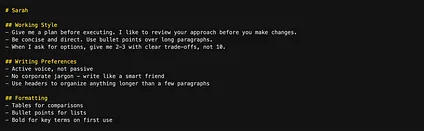
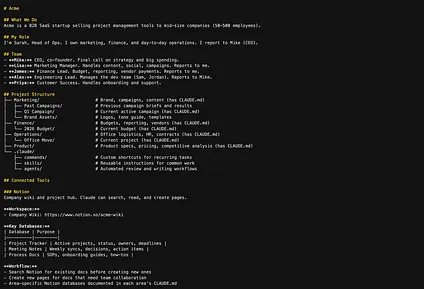
Level 1: ~/Acme/ CLAUDE.md (Company context)一级:~/Acme/ CLAUDE.md(公司背景)
This is Sarah at Acme - what the company does, her role, her team, and where things live. The team section is what lets Sarah say “Lisa thinks we should push the launch” without re-introducing Lisa every session. The tree-format document index shows Claude the full landscape - what’s where, what each area is for, and which folders have their own CLAUDE.md files with deeper context. The.claude/ folder is where custom commands, skills, and agents live, and the Connected Tools section documents what MCP servers are available (we’ll deep dive into all of these in future articles in this series).
这是 Acme 的 Sarah - 公司业务、她的职位、她的团队以及各项事务的存放位置。团队部分让 Sarah 可以说“Lisa 认为我们应该推动发布”,而无需在每次对话时都重新介绍 Lisa。树状文档索引向 Claude 展示了全貌——各项内容的位置、各自的用途,以及哪些文件夹拥有自己的 CLAUDE.md 文件以提供更深入的背景信息。.claude/ 文件夹存放自定义命令、技能和代理,而“已连接工具”部分记录了可用的 MCP 服务器(我们将在本系列的未来文章中深入探讨所有这些内容)。
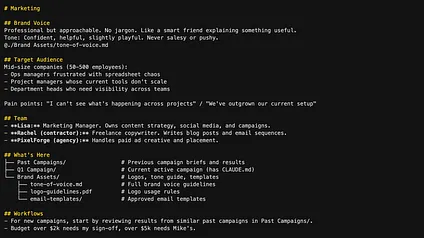
Level 2: ~/Acme/Marketing/ CLAUDE.md (Area context)二级:~/Acme/Marketing/ CLAUDE.md(区域背景)
Marketing-specific context that applies to any marketing work Sarah does, not just one campaign. Brand Voice and Target Audience give Claude the domain knowledge to write on-brand content. Notice the @ import on the brand voice line — Sarah keeps the detailed brand voice guidelines in a separate file. She imports the file rather than pasting the guidelines directly into this CLAUDE.md. This way, she can also load these guidelines into other CLAUDE.md files that need to know about brand voice, like the Product one. One file, multiple imports, always in sync. The team section tells Claude who Rachel and PixelForge are when Sarah mentions them, the document index drills into the Brand Assets folder so Claude knows where to find things, and the workflows tell Claude how to approach marketing tasks — including approval guardrails.
适用于 Sarah 进行任何营销工作的营销特定上下文,而不仅仅是某一个活动。品牌声音和目标受众为 Claude 提供了编写符合品牌的内容的领域知识。注意品牌声音行上的@导入——Sarah 将详细的品牌声音指南保存在一个单独的文件中。她导入文件,而不是直接将指南粘贴到此 CLAUDE.md 中。这样,她还可以将这些指南加载到其他需要了解品牌声音的 CLAUDE.md 文件中,例如产品文件。一个文件,多个导入,始终同步。团队部分在 Sarah 提到 Rachel 和 PixelForge 时,会告诉 Claude 她们是谁,文档索引会深入到品牌资产文件夹,以便 Claude 知道在哪里找到内容,而工作流程会告诉 Claude 如何处理营销任务——包括审批的保障措施。
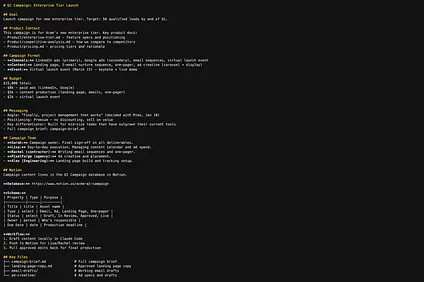
Level 3: ~/Acme/Marketing/Q1 Campaign/ CLAUDE.md (Project context)Level 3: ~/Acme/Marketing/Q1 Campaign/ CLAUDE.md (项目上下文)
The most specific level - the actual project Sarah is working on right now. This is the longest CLAUDE.md file, because project-level work needs the most specific context. The Messaging section keeps the campaign’s core identity consistent across sessions - angle, positioning, and differentiator all in one place. The Product Context section shows a powerful pattern: the CLAUDE.md file can point to files anywhere in the project, not just its own folder. When Sarah asks Claude to draft ad copy, Claude can pull in the product positioning and competitive analysis without her having to explain the product every session. And the Campaign Team narrows the people context to just who’s working on this project - including cross-functional contributors like Alex from engineering.
最具体的层面——Sarah 目前正在处理的实际项目。这是最长的 CLAUDE.md 文件,因为项目级别的任务需要最具体的上下文。Messaging(信息)部分使营销活动的核心身份在不同会话中保持一致——角度、定位和差异化因素都集中在一处。Product Context(产品上下文)部分展示了一个强大的模式:CLAUDE.md 文件可以指向项目中的任何文件,而不仅仅是它自己的文件夹。当 Sarah 让 Claude 起草广告文案时,Claude 可以调用产品定位和竞争分析,而无需她每次会话都解释产品。Campaign Team(营销活动团队)将人员上下文缩小到仅限于正在参与该项目的人员——包括像工程部的 Alex 这样的跨职能贡献者。
The pattern across all four levels: each CLAUDE.md gets more detailed as the context gets more specific. But notice that even the longest CLAUDE.md file - the project level - stays focused. It’s not a brain dump of everything Sarah knows about the Q1 campaign. It’s the context Claude needs to pick up where the last session left off and work effectively from the start.
四种级别的模式:CLAUDE.md 文件越详细,上下文就越具体。但请注意,即使是最长的 CLAUDE.md 文件——项目级别——也始终保持专注。它并不是 Sarah 关于第一季度活动的全部内容的“头脑倾倒”。它提供了 Claude 开始工作所需要的上下文,以便能够接续上次的对话,并从一开始就有效地工作。
Putting it all together 整合所有内容
You now have two systems working together. The previous article taught you how to manage context while you’re working - seeing how full your session is, compacting on your terms, and keeping tasks focused. This article taught you how to make sure Claude already has the right context before you start working - so you’re not re-explaining your project, your team, and your preferences every session.
现在您有两个系统协同工作。上一篇文章教您如何在工作时管理上下文——了解会话的容量,在您自己的 terms 内进行压缩,并保持任务的专注。本文教您如何在开始工作前确保 Claude 已经拥有正确的上下文——这样您就不必在每次会话中重新解释您的项目、团队和偏好。
Together, they form a cycle:
它们共同构成了一个循环:
- You start a session. CLAUDE.md files load automatically. Your junior employee walks in already briefed on who you are, what you’re working on, and how you want things done.
你开始一个会话。CLAUDE.md 文件会自动加载。你的初级员工走进来了,他已经了解了你是谁、你在做什么以及你希望事情如何完成。 - You work. Because Claude already has the right context, you skip the re-explaining and get straight into productive work. The session accumulates more context as you go - files read, decisions made, and drafts written.
你工作。因为 Claude 已经有了正确的上下文,所以你无需重新解释,直接开始高效工作。随着会话的进行,上下文会不断累积——读取的文件、做出的决定以及撰写的草稿。 - You manage context. When the session gets full, you compact on your terms, keeping what matters and clearing the rest - so output quality stays high throughout the session.
你管理上下文。当会话内容过多时,你可以根据自己的意愿进行压缩,保留重要的内容,清除其余的——这样会话的输出质量就能一直保持很高。 - You close the session. If anything durable came out of the work - new decisions, new team members, or new processes - you update the CLAUDE.md file so the next session starts with that context too.
你结束会话。如果在工作中产生了任何持久性的成果——新的决策、新团队成员或新流程——你都需要更新 CLAUDE.md 文件,以便下次会话也能从该背景信息开始。
Remember parallel sessions from the previous article? Each Claude Code session you open gets its own CLAUDE.md context based on where you’re working. Open a session in your Marketing folder and you get a junior employee who already knows your brand voice, your audience, and your campaign workflow. Open one in Finance and you get a junior employee who knows your budget structure, approval flows, and reporting cadence. Open one in Operations and you get one who knows your vendors, contracts, and office logistics. Same Claude, but each session starts with the exact expertise Claude needs for the work at hand.
还记得上一篇文章中提到的并行会话吗?你打开的每个 Claude Code 会话都会根据你的工作位置获得自己的 CLAUDE.md 上下文。在你的营销文件夹中打开一个会话,你将获得一位已经了解你的品牌语调、受众和营销活动工作流程的初级员工。在财务文件夹中打开一个,你将获得一位了解你的预算结构、审批流程和报告节奏的初级员工。在运营文件夹中打开一个,你将获得一位了解你的供应商、合同和办公后勤的初级员工。使用的是同一个 Claude,但每个会话都从 Claude 完成当前工作所需的精确专业知识开始。
One practical tip: Sarah opens a session in her Marketing folder. Her marketing CLAUDE.md files load - brand voice, audience, campaign workflow - and she has a few tasks to get through. She drafts an email sequence with Claude, and now the session is full of drafts, revisions, and feedback that aren’t relevant to her next task. She runs /clear. Claude wipes the session context - the email drafts, the back-and-forth, all of it - but keeps her CLAUDE.md files loaded. She still has her marketing junior employee, with all the brand voice, audience, and workflow context intact. Just a clean slate for the next task. It’s the fastest way to move between tasks within the same area without starting a whole new session.
一个实用技巧:Sarah 在她的“市场营销”文件夹中打开一个会话。她关于市场营销的 CLAUDE.md 文件加载进来——品牌语调、受众、营销活动工作流程——她还有几项任务需要完成。她用 Claude 起草了一系列电子邮件,现在这个会话充满了草稿、修订和反馈,这些都与她的下一个任务无关。她运行了 /clear 。Claude 清除了会话上下文——电子邮件草稿、来回的讨论,所有这些——但仍然加载着她的 CLAUDE.md 文件。她仍然拥有她的市场营销初级员工,所有品牌语调、受众和工作流程的上下文都完好无损。只是为下一个任务提供了一个干净的起点。这是在同一领域内,无需启动一个全新的会话就能最快地在任务之间切换的方式。
What you should have now您现在应该拥有
If you’ve followed along, you now have:
如果您已经按照前面的步骤操作,您现在应该拥有:
- An understanding of what CLAUDE.md files are: Why loading the right context matters more than loading all of it. Simple markdown files that Claude reads automatically when a session starts, so your junior employee walks in already briefed.
对 CLAUDE.md 文件是什么的理解:为什么加载正确的上下文比加载所有上下文更重要。Claude 在会话开始时会自动读取的简单 Markdown 文件,这样您的初级员工入职时就已经了解情况。 - A folder structure that matches how you work: Organized so the right context loads for each area and project without cluttering your sessions with context you don’t need.
一个与您的工作方式相匹配的文件夹结构:组织良好,以便在不使您的会话充斥您不需要的上下文的情况下,为每个区域和项目加载正确的上下文。 - A framework for what goes in each CLAUDE.md file: What to include at each level of your work, from broad preferences down to specific project details, with concrete examples you can adapt.
用于每个 CLAUDE.md 文件的内容框架:您工作各个层级的内容,从广泛的偏好到具体的项目细节,附带可供您借鉴的具体示例。 - Three methods for writing CLAUDE.md files:Plan mode interview, load existing docs, or generate from a session. Claude does the writing, and you edit.
编写 CLAUDE.md 文件的三种方法:计划模式访谈、加载现有文档或从会话生成。Claude 负责写作,您负责编辑。 - The full picture:Intra-session context management and inter-session context working together in a cycle. Your junior employee starts each session briefed, works effectively, and carries what they learned into the next one.
全景:会话内上下文管理和会话间上下文在一个周期内协同工作。您的初级员工在每个会话开始时都已获得简报,高效工作,并将所学内容带入下一个会话。 - Your first CLAUDE.md file: A working CLAUDE.md file in one of your own project folders, with a top-level ~/CLAUDE.md capturing how you work. The start of a system you’ll keep building on.
您的第一个 CLAUDE.md 文件:您自己项目文件夹中的一个可用 CLAUDE.md 文件,顶层 `~/CLAUDE.md` 记录了您如何工作。这是您将持续构建的系统的开端。
Your first hour 你的第一个小时
You don’t need the perfect folder structure or perfectly tuned CLAUDE.md files to start seeing results. One file in your most active project folder and you’ll immediately feel the difference. Here’s how to spend your first hour:
你不必拥有完美的文件夹结构或精心调整的 CLAUDE.md 文件才能开始看到效果。在你最活跃的项目文件夹里放一个文件,你就能立刻感受到不同。以下是你如何度过第一个小时的方法:
- Think of an area where you want to start using Claude Code (10 min) - Maybe it’s a work project you’re managing, a side project, or even something personal like planning an event. Create a folder for it on your computer and save a few relevant docs there - project briefs, notes, anything Claude might need as context. If you’re not sure how to organize it, use the prompt from the folders section to have Claude interview you and create a structure. Don’t overthink it - you can always reorganize later.
构思一个您想开始使用 Claude Code 的领域(10 分钟)——也许是您正在管理的一个工作项目、一个副业项目,甚至是像策划活动这样的个人事务。在您的电脑上为此创建一个文件夹,并将一些相关文档保存在里面——项目简介、笔记,任何 Claude 可能需要的上下文信息。如果您不确定如何组织,可以使用文件夹部分中的提示,让 Claude 采访您并创建一个结构。不要想太多——您随时可以重新组织。 - Create your top-level ~/CLAUDE.md (10 min) - This file lives in your home folder (~/) — above all your project folders — so it loads no matter where you work. You can create it from any Claude Code session. Switch to plan mode and use this prompt (Remember to keep it short! This is your “how I work” file, not a project file):
创建顶层 `~/CLAUDE.md` 文件(10 分钟)- 此文件位于您的主文件夹(`~`)中,位于所有项目文件夹之上,因此无论您在哪里工作,它都会被加载。您可以在任何 Claude Code 会话中创建它。切换到规划模式并使用以下提示(请记住保持简短!这是您的“工作方式”文件,而不是项目文件):
Interview me about my working style and preferences, then create a CLAUDE.md file in my home folder (~/CLAUDE.md). This should cover how I like to communicate, formatting preferences, and general working style. Keep it to one screen — this file will follow me across every project.
采访我的工作风格和偏好,然后在我的主文件夹(~/CLAUDE.md)中创建一个 CLAUDE.md 文件。该文件应涵盖我的沟通方式、格式偏好以及总体工作风格。保持在一屏之内——该文件将伴随我完成所有项目。
- Create a CLAUDE.md for that project (20 min) - Use whichever method fits where you are: plan mode interview if the context lives in your head, load existing docs if you have briefs or wikis, or generate from a session if you just finished working with Claude on it. Focus on the four types of context: what’s here, who’s involved, what it’s about, and how you want things done.
为该项目创建一个 CLAUDE.md(20 分钟)——使用最适合您当前情况的方法:如果上下文存在于您的脑海中,则使用规划模式访谈;如果您有简报或维基,则加载现有文档;如果您刚刚完成与 Claude 的合作,则从会话中生成。重点关注四种上下文类型:这里有什么、谁参与了、这是关于什么的,以及您希望如何完成。 - Use it for a real task (20 min) - Start a new session in that project folder and work on something real. Notice what you don’t have to re-explain. At the end, ask Claude: “Does the CLAUDE.md for this folder need to be updated with anything from our session?” That’s the cycle: use it, notice what’s missing, update, repeat.
用它来完成一项实际任务(20 分钟)- 在该项目文件夹中开始一个新会话,并着手处理一些实际事务。注意你无需再次解释的内容。最后,问 Claude:“这个文件夹的 CLAUDE.md 是否需要用我们本次会话中的任何内容进行更新?”这就是循环:使用它,注意缺失的内容,更新,重复。
One tip for all of these steps: Dictate instead of type. You speak 3-4x faster than you type, and your natural speech patterns capture context you’d forget to write down. A tool like Wispr Flow lets you talk through Claude’s questions at the speed of thought.
所有这些步骤都有一个技巧:用说代替打字。你的语速是打字速度的 3-4 倍,而且你自然的说话方式能捕捉到你容易忘记写下来的上下文。像 Wispr Flow 这样的工具可以让你以思维的速度与 Claude 交流问题。
You started this article with a junior employee who showed up every morning with no memory of yesterday. Now they walk in already knowing your project, your team, your preferences, and how you want things done. You’ve given Claude the one thing it always needed: memory that persists.
这篇文章的开头,我们讲到一位初级员工,他每天早上来上班时都记不清昨天的事情。现在,他走进办公室就对你的项目、你的团队、你的偏好以及你希望如何处理事情了如指掌。你已经给了 Claude 它一直需要的东西:持久的记忆。

Want to go deeper? 想了解更多?
This article focused on knowledge work. If you want a coding-focused deep dive on CLAUDE.md files, check out the CLAUDE.md Masterclass from Claude Code Masterclass. It covers the developer side of things: codebase-aware CLAUDE.md files, technical project structure, and patterns that work well for engineering teams. Between this article and that one, you’ll have the full picture regardless of how you use Claude Code.
本文聚焦于知识工作。如果您想深入了解 CLAUDE.md 文件在编码方面的应用,请查看 Claude Code Masterclass 的 CLAUDE.md Masterclass。该课程涵盖了开发人员相关的内容:与代码库相关的 CLAUDE.md 文件、技术项目结构以及适合工程团队的模式。结合本文和该课程,无论您如何使用 Claude Code,都能获得全面的了解。