7 Gemini 2.0 hacks to maximize its full potential — here's how to try them 2
~~文章摘要~~
本文介绍了 Google 的 Gemini 2.0 AI 助手及其独特功能,帮助用户提升工作效率和创造力。文章提供了 7 个使用技巧,包括选择 Flash 2.0 模型、利用提示库分析图像、快速总结 PDF、屏幕共享进行数据分析、视频内容优化、技术问题排查以及将 Gemini 作为软件导师。此外,还提供了内容创作的额外技巧,帮助用户优化 YouTube 视频策略。
~~关键事实~~
- Flash 2.0 模型:更快、更智能,适合处理复杂任务。
- 提示库:提供图像分析工具,如“What is This?”提示。
- PDF 总结:快速提取文档关键点,生成简明摘要。
- 数据分析:通过屏幕共享提取网页信息,生成表格或要点。
- 视频分析:分析视频内容,推荐缩略图设计,优化节奏和过渡。
- 技术问题排查:诊断并解决技术问题,如摄像头或麦克风故障。
- 软件导师:指导用户使用 Excel 等复杂软件,提供逐步说明。
- 内容创作优化:分析 YouTube 视频,推荐标题和主题,提升观众参与度。
~~文章正文~~

(Image credit: Shutterstock)
(图片来源:Shutterstock)
Google’s Gemini 2.0 is a powerhouse when it comes to speed and precision, making it the perfect AI assistant to handle a range of tasks — ranging from coding and software troubleshooting to video analyzation and document summarization.
Google 的 Gemini 2.0 在速度和精度方面非常强大,使其成为处理一系列任务的完美 AI 助手——从编码和软件故障排除到视频分析和文档摘要。
To fully harness the chatbot’s unique features, I’ve compiled a list of my favorite Gemini tips that utilize the latest unique features to help you save time and take your personal and professional projects to the next level. Here are 7 hacks to get the most out of Gemini 2.0.
为了充分利用聊天机器人的独特功能,我编制了一份我最喜欢的 Gemini 技巧清单,这些技巧利用最新的独特功能来帮助您节省时间并将您的个人和专业项目提升到一个新的水平。以下是充分利用 Gemini 7 的 2.0 个技巧。
1. Be sure you use the Flash 2.0 model
1. 确保您使用的是 Flash 2.0 模型
(Image credit: Future) (图片来源:未来)
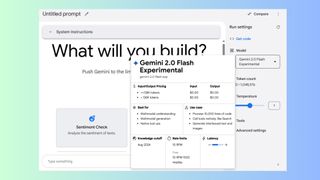
For the best Gemini experience, be sure you are selecting the right model. The default model is not 2.0, so you will need to select it to use the newest model. Start by logging in with your Google account and head to settings on the right side of your screen. From there, choose the Flash 2.0 experimental model.
为了获得最佳的 Gemini 体验,请确保您选择了正确的模型。默认模型不是 2.0,因此您需要选择它才能使用最新模型。首先使用您的 Google 帐户登录,然后前往屏幕右侧的设置。从那里,选择 Flash 2.0 实验模型。
This version is faster, smarter and better at handling complex tasks. You’ll immediately notice how much cleaner and clearer the responses are with Flash 2.0 to help you move through projects more efficiently.
此版本更快、更智能,并且更适合处理复杂任务。您会立即注意到 Flash 2.0 的响应更加清晰和清晰,可帮助您更高效地完成项目。
2. Use the prompt gallery for image insights
2. 使用提示库获取图像洞察
(Image credit: Future) (图片来源:未来)
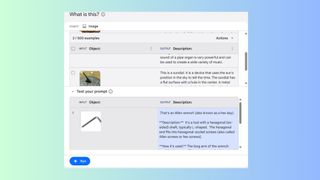
The Prompt Gallery within Gemini 2.0 is a goldmine of tools. One of my favorites is the “What is This?” prompt that analyzes images. To use this feature, simply upload an image and Gemini will analyze it, including providing a detailed description.
Gemini 2.0 中的提示库是一座工具金矿。我最喜欢的之一是分析图像的 “What is This?” 提示。要使用此功能,只需上传一张图片,Gemini 就会对其进行分析,包括提供详细说明。
LATEST VIDEOS FROM tomsguide 最新视频 - 来自 tomsguide
Whether you’re doing research or need further context that a detailed description can provide, this feature is impressively accurate. Be sure to explore all the prompts within the gallery to unlock more creative ways to use Gemini for image-related tasks.
无论您是在进行研究还是需要详细描述可以提供的更多上下文,此功能都非常准确。请务必探索图库中的所有提示,以解锁更多创造性的方式来使用 Gemini 完成与图像相关的任务。
3. Summarize a PDF fast
3. 快速总结 PDF
(Image credit: Future) (图片来源:未来)
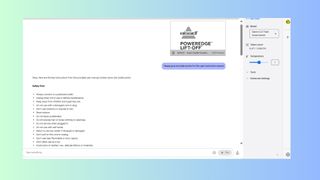
If you don’t have time to read a lengthy document, let Gemini 2.0 do the heavy lifting by extracting the document’s key points. Try uploading a PDF and ask the chatbot to create a concise summary for a 10-minute presentation.
如果您没有时间阅读冗长的文档,请让 Gemini 2.0 通过提取文档的关键点来完成繁重的工作。尝试上传 PDF 并让聊天机器人为 10 分钟的演示创建一个简明的摘要。
Within minutes, you’ll get a highlight of the main ideas, visual suggestions and event action items to help make your presentation a success. This feature is useful for professional and academic use to ensure your presentation delivers.
在几分钟内,您将获得主要思想、视觉建议和活动行动项目的亮点,以帮助您的演示文稿取得成功。此功能对于专业和学术用途非常有用,以确保您的演示文稿交付。
I have personally used it to help craft an elevator pitch for a producer after uploading my screenplay. Out of all the chatbots, I have found that Gemini offers the best summarization with the most accuracy and attention to detail.
我个人在上传我的剧本后用它来帮助制片人制作电梯游说。在所有聊天机器人中,我发现 Gemini 以最准确和最注重细节的方式提供了最好的摘要。
Get instant access to breaking news, the hottest reviews, great deals and helpful tips.
(Image credit: Future) (图片来源:未来)
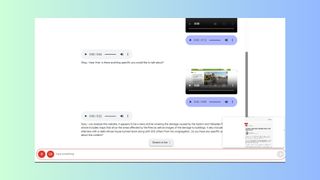
Research and data analysis can be tedious, but Gemini makes it effortless. Start by sharing your screen with Gemini and showing the chatbot a webpage. You’re going to need to make sure it can see the whole page. If necessary, you can shrink it down or zoom out.
研究和数据分析可能很乏味,但 Gemini 让它变得毫不费力。首先与 Gemini 共享您的屏幕并向聊天机器人展示一个网页。您需要确保它可以看到整个页面。如有必要,您可以缩小或缩小它。
Don’t worry if it’s too small for you – Gemini can handle it. From there, ask Gemini to extract the information into a format of your choice such as a table or bullet points. This is idea for compiling reports or gathering data for a project without the hassle of manual entry.
如果它对您来说太小,请不要担心 - Gemini 可以处理它。从那里,让 Gemini 将信息提取成您选择的格式,例如表格或要点。这是为项目编制报告或收集数据的想法,无需手动输入的麻烦。
Level up your video content
提升您的视频内容
(Image credit: Future) (图片来源:未来)
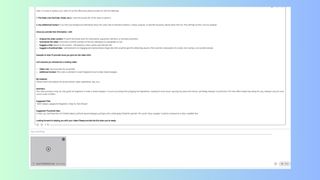
Whether you’re prepping a casual family video to share or working on a professional presentation, Gemini 2.0 makes video analysis a breeze. Start by uploading your video and prompt the chatbot to analyze and summarize the content. From there, prompt it to suggest engaging thumbnail designs according to your style. Once the images are generated, you can tweak them to fully meet your needs.
无论您是准备休闲的家庭视频进行分享还是进行专业演示,Gemini 2.0 都能让视频分析变得轻而易举。首先上传您的视频并提示聊天机器人分析和总结内容。从那里,提示它根据您的风格推荐引人入胜的缩略图设计。生成图像后,您可以对其进行调整以完全满足您的需求。
Ask Gemini 2.0 to identify areas for improvement, such as pacing or transitions. For content creators, this is like having your own editor on standby. For casual users, you’ll surely impress friends with your editing skills. Either way, you can take the guesswork out of how to craft your videos while grabbing the attention of potential viewers.
要求 Gemini 2.0 确定需要改进的地方,例如节奏或过渡。对于内容创建者来说,这就像拥有自己的编辑器随时待命。对于临时用户,您的编辑技巧一定会给朋友留下深刻印象。无论哪种方式,您都可以在吸引潜在观众注意力的同时消除如何制作视频的猜测。
Troubleshoot tech issues 排查技术问题
(Image credit: Future) (图片来源:未来)
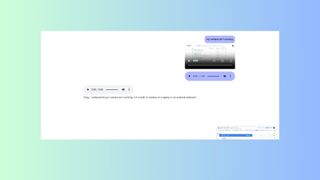
The next time you’re tempted to call IT with a technical hiccup, Gemini can help. Start by sharing your screen and explain your issue. You can say something such as “My camera isn’t working” or “fix my microphone” and Gemini will diagnose the problem.
下次您因技术问题而想致电 IT 时,Gemini 可以提供帮助。首先共享您的屏幕并解释您的问题。您可以说“我的相机不工作”或“修理我的麦克风”之类的话,Gemini 会诊断问题。
It can even walk you through solutions such as checking your audio settings or helping you update drivers. Having Gemini on standby is like having tech support 24/7.
它甚至可以引导您完成解决方案,例如检查您的音频设置或帮助您更新驱动程序。让 Gemini 处于待机状态就像拥有 24/7 的技术支持。
Turn Gemini into your software tutor
将 Gemini 变成您的软件导师
(Image credit: Future) (图片来源:未来)
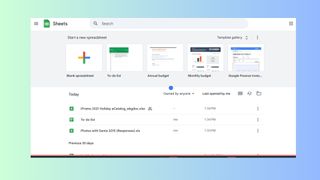
Those of us who have ever felt stuck navigating an Excel document or another complex program can no find relief with Gemini 2.0 as our personal tutor. Start by sharing your screen with your document open.
我们这些曾经在浏览 Excel 文档或其他复杂程序时感到困惑的人,无法找到 Gemini 2.0 作为我们的私人导师的解脱。首先在文档打开的情况下共享您的屏幕。
From there, ask Gemini any question such as format questions or even advanced functions. It will provide clear instructions to help guide you step-by-step, allowing you to learn new skills in the process. This is a must-try hack for anyone who regularly works with spreadsheets.
Bonus: Supercharge your content creation
(Image credit: Future)
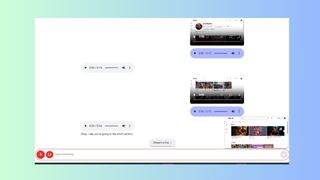
Aspiring YouTubers, listen up. Gemini 2.0 offers tools to optimize your content strategy. Simply share your screen and search for a specific topic on Youtube. Then, ask Gemini to analyze the videos within your niche.
It will not only analyze the competition, but it will also identify trends, recommend titles for your videos, and suggest topics that resonate with viewers. With Gemini as your guide, your topics are sure to stand out and get more engagement.
Final thoughts
Gemini 2.0 Is a game-changer. The versatile AI assistant enhances enhances productivity and creativity across various tasks.
Its multimodal capabilities allow it to seamlessly handle text, images, video and even live troubleshooting. With these 7 hacks and a bonus, you can unlock its full potential, helping you work faster and smarter while making it more enjoyable.
More from Tom's Guide
- I put Grok vs MetaAI in a 7-round face-off — here's the winner
- 7 ChatGPT hacks to maximize your productivity — here's how to try them
- Google NotebookLM just got way better with its new interactive features — here's why I'm impressed